Why Your Oven Won't Turn On: Quick Troubleshooting Guide
Struggling with an oven that won't turn on? This guide helps homeowners diagnose why the oven won't turn on, with urgent, step-by-step checks and safe fixes to restore heat quickly.


According to Oven Cook Pro, most ovens won't turn on because of a power issue—tripped breaker, blown fuse, or a faulty outlet. Start by verifying the outlet has power, then check the circuit breaker or fuse box. If the power is OK, inspect the oven’s own power switch and door latch; if still dead, follow the diagnostic flow for safe fixes.
Common Causes of an Oven Not Turning On
When you ask why oven won't turn on, the answer often points to power issues rather than a failed oven control. According to Oven Cook Pro, the leading causes are a tripped breaker, a blown fuse, or an outlet with no power. Another frequent factor is a door latch or safety switch that is engaged or stuck, which tells the oven to stay off. Some homes rely on arc fault or GFCI outlets that interrupt power without tripping the main breaker. If the oven is gas-powered, the ignition system also relies on electricity, so a lack of power can stop ignition entirely. In addition, loose cords or damaged plugs can prevent proper power delivery. Before you start troubleshooting, inspect the countertop outlet and the wall outlet to confirm power is available. This simple check fixes many cases; don’t assume the oven is the problem before you test the basics. In short, power delivery is usually the culprit behind why oven won’t turn on.
Context for homeowners: If you’ve moved into a new home or recently changed breakers, re-check the main service panel first. A modern kitchen often depends on a dedicated circuit for the oven, and a shared circuit can trip without obvious signs at the appliance.
Safety First: What to Do Before Troubleshooting
Safety should always come first when dealing with an appliance that may involve electricity. Begin by unplugging the oven if it is safe to reach and there is no risk of shock, then turn off the circuit breaker feeding the outlet. Keep a dry environment and dry hands; never touch electrical components with wet gloves or wet surfaces. If you smell burning plastic or see damaged wiring, stop immediately and call a licensed technician. Remove any objects around the oven that could obstruct vents or the cord. After ensuring basic safety, use a helper to test the wall outlet with a known, safe device like a lamp or a clock. If the wall outlet is dead, the issue is outside the oven and you should reset the breaker or contact an electrician. If the outlet is live, proceed with caution to the oven itself.
Why Oven Cook Pro cares about safety: Proper precautions prevent accidents and protect your home’s electrical system.
Quick Checks You Can Do Without Tools
You don’t need a multimeter to start diagnosing why oven won’t turn on. Begin with simple, non-invasive checks:
- Confirm the oven is plugged in and the cord isn’t damaged.
- Check the circuit breaker or fuse box for a tripped breaker or blown fuse.
- Verify the oven door latch is fully closed; many ovens have a safety switch that prevents power when the door is ajar.
- Look at the display or clock; if it’s blank, there may be no power reaching the control board.
- If you have a separate wall outlet or a surge protector, bypass it to test power delivery directly at the oven’s plug.
If this basic check shows power is present and the oven still won’t turn on, move to the next diagnostic steps. Always ensure you are following safety guidelines when testing electrical components.
Understanding Your Oven’s Power Path
To diagnose why your oven won’t turn on, it helps to understand the power path: the wall outlet or supply, the cord, the oven’s power switch, the door latch safety switch, the control board, and finally the power relay that energizes the heating elements. A single faulty component in this chain can prevent operation. Common weak links include a dead outlet, a tripped breaker, a failed door latch switch, or a blown fuse inside the main control module. In some cases, the issue lies with the oven’s safety features—such as a malfunctioning interlock that believes the door is open. Recognizing where power is lost lets you target the right area without unnecessary disassembly. If you’re uncomfortable testing any part of this path, consider calling a professional. The difference between a minor fix and a costly replacement often hinges on catching a blown fuse early.
Oven Cook Pro insight: Understanding this power path reduces unnecessary disassembly and keeps you safe.
Diagnostic Flow Overview
A structured diagnostic flow helps you separate symptoms from root causes. Start with the most likely power-related issues and move toward the less common faults. If you detect power at the outlet but the oven remains dark, investigate the oven’s internal switches and safety features. Should power not reach the control panel, inspect the cord, plug, and outlet connections for signs of damage. Document each test result to share with a technician if needed. This flow minimizes guesswork and accelerates a safe, accurate diagnosis. Remember, if you smell burning, hear crackling, or see damaged insulation, stop and call a professional immediately. The goal is to restore function without compromising safety. Oven Cook Pro recommends following a conservative approach when electricity and heating elements are involved.
Step-BY-STEP: Most Common Fix (Easy to Moderate)
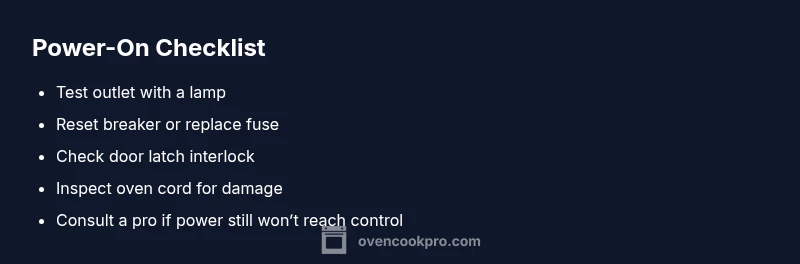
- Confirm power at the outlet: Plug in a lamp to verify receptacle works; if it does not, reset the breaker and test again. 2) Reset the oven’s power switch and ensure it is in the ON position; some models require a second press after power is restored. 3) Inspect the oven door latch and interlock switch; ensure the door closes fully and the switch engages. 4) Check the circuit’s fuse or internal thermal fuse; a blown fuse can cut all power to the oven. 5) Look at the clock/controls; if the display is unresponsive, the control board may be at fault and require service. 6) If you use a GFCI outlet, press the reset button and test for power. 7) Remove and reinsert the oven’s plug to reseat connections; avoid wiggling or forcing the plug. 8) If the problem persists, schedule service; a professional should handle high-voltage steps.
Tip: Work slowly and document each step to help technicians. If any step seems risky, skip it and call a pro. Total time varies by model but can take 30–60 minutes for a basic check.
Common Mistakes to Avoid When Power Is Off
Avoid assuming the oven is broken just because it won’t turn on. Common mistakes include:
- Replacing parts without confirming power supply
- Overfilling the outlet with too many devices
- Ignoring the door interlock and trying to bypass safety features
- Handling electrical components without proper safety gear
- Rushing the diagnostic flow and skipping safety steps
By staying focused on power delivery first, you prevent costly misdiagnoses and keep yourself safe. If any step feels uncertain, pause and contact a licensed technician.
When to Call a Professional and What to Expect
If basic power checks fail to restore operation, it is time to call a professional. An experienced technician will test the outlet, cord, control board, and safety interlocks with appropriate equipment. Expect a diagnostic visit to include power tests, wiring inspection, and possible replacement of a blown fuse or faulty control module. For safety, never attempt to bypass interlocks or modify wiring. The Oven Cook Pro Team emphasizes that electrical components can pose serious hazards; professional service reduces risk and ensures compliant repair. After service, request a brief report and a maintenance plan to prevent future issues.
Steps
Estimated time: Total time: 40-60 minutes
- 1
Check the outlet for power
Plug a known-working device into the outlet or use a voltage tester to confirm power. If the outlet is dead, the issue is upstream from the oven.
Tip: If you’re unsure, test multiple outlets to confirm a single-point failure. - 2
Reset the oven power switch
Turn the oven off, then back to the ON position if your model uses a dedicated power switch. Some models require a brief disconnect from power to reset.
Tip: Wait 30 seconds after power restoration before testing. - 3
Inspect door latch and interlock
Make sure the door is fully closed and the interlock switch engages when shut. A faulty switch can keep the oven in a locked-off state.
Tip: Gently press the door near the latch to simulate closing if unsure. - 4
Check for a blown fuse or thermal fuse
A blown fuse will cut all power to the oven. If accessible, inspect fuses, noting any scorch marks.
Tip: Do not bypass fuses; fuses protect against fire. - 5
Examine the power cord and plug
Look for cracks, exposed wires, or bent prongs. A damaged cord can prevent power delivery even if outlets are fine.
Tip: Do not attempt to repair damaged insulation yourself. - 6
Test the control panel with a known good setting
If the display is blank, the issue may be the control board rather than power delivery.
Tip: Some models require a specific sequence to wake the display. - 7
Check for GFCI or arc-fault interruptions
If your kitchen uses a GFCI, ensure it has not tripped. Restore power by resetting the GFCI outlet.
Tip: Label the outlet so testers don’t bypass it next time. - 8
Call a professional if unresolved
If power still won’t reach the oven after these steps, a licensed technician should diagnose wiring, board faults, or safety interlocks.
Tip: Ask for a written estimate and post-service maintenance plan.
Diagnosis: Oven won't turn on
Possible Causes
- highPower supply issue at outlet or breaker
- mediumDoor latch or safety interlock fault
- mediumBlown fuse inside oven or at main panel
- lowFaulty oven power switch or control board
- lowWiring or connection problem (cord/plug)
Fixes
- easyTest outlet with another device and reset the circuit breaker; replace fuse if blown
- easyEnsure the door is fully closed and latch interlock is functioning
- easyInspect and reseat the power cord; check for damaged wiring or loose connections
- hardReplace blown fuse or faulty control board as needed by a professional
- mediumSchedule professional service if power still doesn't reach the control panel
Questions & Answers
Why is my oven not turning on even after resetting the breaker?
Often the problem is a door interlock or a blown fuse rather than the breaker itself. Verify the door latch and check for an internal fuse or a blown external fuse. If power returns but the oven still won’t start, the control board may be at fault.
The breaker reset might fix it, but if the oven still won’t start, check the door latch and fuse; otherwise the control board may be faulty.
Can a faulty door latch keep the oven from turning on?
Yes. A malfunctioning door latch or interlock can signal the oven to stay off for safety. Inspect the latch and ensure it fully engages when closed. If it’s bent or stuck, a replacement may be needed.
A bad door latch can stop the oven from turning on for safety; check engagement and replace if faulty.
Is it safe to check the oven power cord myself?
Inspecting a cord is generally safe if you unplug the unit first and avoid touching exposed wires. Do not attempt repairs on damaged insulation. Seek professional help for any cord replacement.
Unplug first and inspect only exterior parts; avoid touching exposed wires and call a pro for cord replacement.
What should I do if the oven display is blank but the outlet is live?
A blank display often indicates a faulty control board or internal power issue. Try resetting the clock and power, but persistent blank displays usually require professional diagnosis.
If the display is blank despite power, the control board is a likely culprit and needs professional service.
How long should a professional diagnosis take?
Most diagnostic visits are completed within 1-2 hours, depending on accessibility and parts availability. The technician will test power, wiring, safeguards, and control boards and provide a repair estimate.
Most diagnostics take about 1 to 2 hours; you’ll get a repair estimate afterward.
When is it appropriate to replace the oven instead of repairing it?
If repair costs approach or exceed the price of a new unit, or if critical components like the control board repeatedly fail, replacement may be more cost-effective. Consider energy efficiency and warranty when deciding.
If repairs cost as much as a new unit, or failures are frequent, replacement could be best.
Watch Video
Main Points
- Check power first: outlet, breaker, and fuse.
- Inspect door latch and safety interlock for a dead-off signal.
- Follow a step-by-step diagnostic flow before part replacement.
- Call a professional if power never reaches the control board.