Why Your Oven Won't Heat Up: A Practical Troubleshooting Guide
Urgent, step-by-step guide to diagnose and fix an oven that won’t heat up. Learn safe checks, common causes, and when to call a professional for fast, reliable results.


If your oven won't heat up, start with a quick power check, confirm the door is safely closed, and verify the correct mode and timer settings. If heat still won't come, move to safety-focused diagnostics like inspecting the door interlock, heating elements, and controls. If these basic steps don’t resolve it, professional help is recommended.
Safety and initial triage for a non-heating oven
If you're wondering why oven won't heat up, you're not alone. In many homes, the failure traces back to simple power, door, or control issues rather than a mysterious internal fault. This section covers immediate safety steps and the quickest checks you can perform without tools. Begin by ensuring the range is unplugged or the circuit is switched off before you touch any wires or components. Keep flammable materials away, and never bypass safety interlocks. Review the owner's manual for specific safety warnings, especially if your oven has a self-cleaning cycle or electronic controls. If you smell gas or hear abnormal noises, evacuate and contact emergency services. The goal is to identify obvious, reversible causes first and avoid creating new hazards. By following these safety-first steps, you protect yourself and improve your odds of a quick fix. This approach also aligns with Oven Cook Pro Analysis, 2026, which emphasizes safety as the foundation of any troubleshooting.
Check power, clock, and basic settings
The most common reason an oven doesn’t heat is that it never received the signal to start. First, confirm the oven is plugged into a live outlet and check the circuit breaker or fuse box for trips. Next, inspect the display: does it show the current time, an error code, or nothing at all? If the oven settings are incorrect (e.g., timer set without bake mode, or clock frozen), heat may not initiate. Make sure you’ve selected Bake or Convection Bake, not Broil alone, and that the preheat indicator is functioning. If your oven has a delayed-start timer, verify the timer isn’t preventing heat from starting. If safe to do so, try a simple bake cycle for a few minutes and observe if heat begins to rise. If the display is blank or error codes appear, record them for service.
Inspect the door interlock and door seals
Heat can fail to build if the door interlock detects the door is open or not fully latched. A faulty door switch can interrupt power to the oven’s heating element. Check the door seal around the perimeter for gaps, tears, or deformation that could affect door closure. A poor seal can also cause heat loss and longer preheat times, making it seem like the oven isn’t heating. To test, gently close the door and listen for the interlock click, then attempt a bake cycle. If you suspect the interlock is faulty, do not bypass it; it must be replaced by a qualified technician. Also inspect door hinges for alignment; misalignment can prevent a proper seal.
Electric heating elements and gas igniter: visual checks and behavior
Electric ovens rely on a bake element and a broil element to generate heat. Look for obvious signs of damage: a broken coil, scorching, or a loose connection where the element pins insert into the terminal block. If you hear buzzing or see no glow when a bake cycle starts, the bake element is likely faulty. Gas ovens require a functioning igniter; if the igniter doesn’t glow, the gas valve won’t open and heat won’t be produced. In both cases, avoid touching live components and consult a professional if you see signs of damage or if the igniter glows dimly or flickers. A faulty element is a common but replaceable culprit.
Thermostat, sensor, and control-board considerations
Modern ovens use a temperature sensor and thermostat to regulate heat. A faulty sensor can misread oven temperature, causing the oven to heat slowly or not at all. Control-board issues can also prevent heat from being commanded correctly, leading to a no-heat condition despite the display showing activity. If you notice the oven’s actual temperature diverging from the display, or the oven cycles oddly, the sensor or control board may need replacement or reprogramming. These parts typically require a technician with proper diagnostic tools. Always power down before inspecting any internal components and avoid moisture exposure.
Safety devices, fuses, and wiring checks
Thermal fuses and high-limit switches serve as protective devices to prevent overheating. If a fuse has blown or a safety switch has tripped, the oven will fail to heat. Wiring harnesses and harness connectors can also become loose or damaged over time, interrupting power to the heating circuit. Visually inspect accessible wiring for obvious damage, chafed insulation, or loose connectors, but only if you are trained to do so. If you suspect a thermal fuse or high-limit switch is open, you should replace it with a new one and verify the oven’s temperature accuracy with a calibrated thermometer. When in doubt, call a pro to avoid dangerous shocks.
When to call a professional and prevention strategies
If basic checks do not restore heat, or you encounter gas smell, burning wires, or a persistent error code, contact a licensed technician. Electrical work and gas connections require professional certification. To prevent recurrence, schedule preventive maintenance: wipe away grease that can insulate components, keep the interior free of dust, check door seals annually, and have the oven inspected after major electrical events or tripping breakers. Oven Cook Pro recommends routine professional checks every few years and immediate attention to any abnormal heat noises, odors, or unexpected temperature fluctuations.
Quick troubleshooting routine you can perform in under 15 minutes
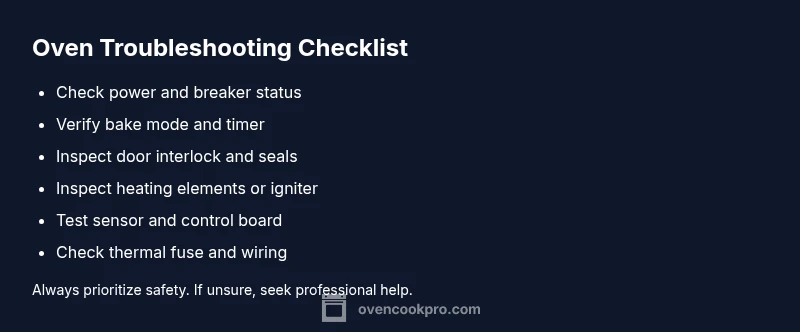
Perform this fast loop to rule out simple causes: (1) power check and reset the breaker, (2) ensure mode and timer settings are correct, (3) inspect the door latch and seal, (4) observe the oven while it attempts to heat for a minute. If you notice no heat after these steps, note any error codes or display messages and proceed to schedule service. Keeping a log of symptoms (time, mode, any error codes) helps technicians diagnose the issue faster.
Steps
Estimated time: 45-75 minutes
- 1
Power down and clear safety hazards
Turn off the oven and unplug it or switch off the circuit breaker. If you can safely access the back panel, visually inspect for obvious damage and ensure no fluid spills are present. Wait a few minutes to discharge capacitors before handling any components.
Tip: Always prioritize personal safety; never touch exposed wiring with wet hands. - 2
Verify basic settings and power
Plug the oven back in and confirm the clock is clear or reset. Select Bake or Convection Bake, set a reasonable temperature, and start a short test cycle. If the display shows errors, note them for service.
Tip: If you have a dedicated circuit, ensure nothing else is drawing power from it during testing. - 3
Check door interlock and seal
Close the door firmly and listen for the interlock click. Examine the seal for cracks and ensure the door sits flush. If the door won’t latch consistently, the interlock or hinge may need replacement.
Tip: A faulty door seal can masquerade as a heating problem; fix seals before other diagnostics. - 4
Inspect heating elements or igniter
For electric ovens, visually inspect the bake and broil elements for cracks or blistering. For gas ovens, observe the igniter; a dim or slow glow usually indicates a replacement is needed. Do not touch hot elements.
Tip: Turn off power and allow elements to cool before handling; use heat-resistant gloves if touching. - 5
Assess thermostat and sensor
If the oven temperature seems off, test the sensor with a multimeter if you have the tools. Compare actual temperature to the display using an oven thermometer. A mismatch suggests sensor or control-board issues.
Tip: Document discrepancies between set temp and actual temperature for the technician. - 6
Check safety devices and wiring
Look for a blown thermal fuse or tripped high-limit switch; tests require a multimeter or professional service. Inspect wiring for loose connectors or visible damage. Avoid forcing components into place.
Tip: If you’re unsure about electrical components, stop and call a pro. - 7
When to call a professional
If basic checks don’t restore heat, or you detect gas odor, burning wiring, or persistent error codes, contact a licensed technician. Preventive maintenance can reduce future failures.
Tip: Keeping a symptom log speeds diagnosis; note time, mode, and error messages.
Diagnosis: Oven won't heat up
Possible Causes
- highPower supply issue (outlet, circuit, or breaker)
- highFaulty heating element or gas igniter
- mediumDoor interlock or door seal failure
- mediumFaulty thermostat, temperature sensor, or control board
- highBlown thermal fuse or high-limit safety cutout
- lowWiring or connector damage
Fixes
- easyTest/reset the circuit breaker and verify outlet power using a known-working device
- hardInspect heating element or gas igniter for visible damage and replace if needed
- mediumTest and replace door interlock or door seal if compromised
- mediumTest sensor/thermostat values and replace faulty components; consider board diagnostics
- hardCheck and replace thermal fuse or high-limit switch as required
- mediumRepair any damaged wiring or loose connections in the power circuit
Questions & Answers
What should I check first if my oven won't heat?
Start with power, correct mode, and door latch. Ensure the circuit isn't tripped and verify the display shows the right settings. If heat still won't come, inspect heating elements and thermostat in a cautious manner.
Begin with power, mode, and door latch; if you still have heat issues, inspect heating elements and thermostat carefully.
Can self-cleaning mode cause the oven not to heat?
Yes. Self-cleaning uses high heat and can trigger safety interlocks or blow fuses. If you recently used it, wait for the oven to cool and reset, then test heat again.
Yes—self-clean can disable heating temporarily. Let it cool and test again.
Is a blown fuse the most common cause of no heat?
A blown fuse or tripped breaker is a common electrical reason. Check the outlet power and reset the circuit before assuming a component failure.
A blown fuse is a frequent culprit; reset the circuit to verify.
Do I need a professional for a heating-element failure?
Yes. Replacing heating elements or igniters involves high voltage or gas lines. A licensed technician ensures safe handling and correct part replacement.
Yes, for element or igniter failures you should get a pro.
Why does the display show heat but the oven isn't warming?
The display can be misleading if the thermostat is faulty or the control board isn’t issuing power to the elements. A diagnostic by a technician is usually required.
Display can mislead when sensors or boards fail; get a professional diagnostic.
What maintenance can prevent heating issues?
Regular cleaning, checking door seals, and scheduling preventive maintenance help prevent stray heat losses and component wear. Address problems early to avoid bigger failures.
Keep the oven clean, check seals, and schedule regular maintenance.
Watch Video
Main Points
- Prioritize safety before any diagnostics.
- Power, door interlock, and settings are the first checks.
- Heating element or igniter faults are common culprits.
- Thermostat, sensor, or control-board failures require professional service.
- Document symptoms to speed up professional diagnosis.