What to Do When Your Oven Is Not Heating Up
Urgent, step-by-step troubleshooting for homeowners: diagnose power, elements, fuses, and control boards when the oven won’t heat. Safe, homeowner-friendly checks plus pro guidance.


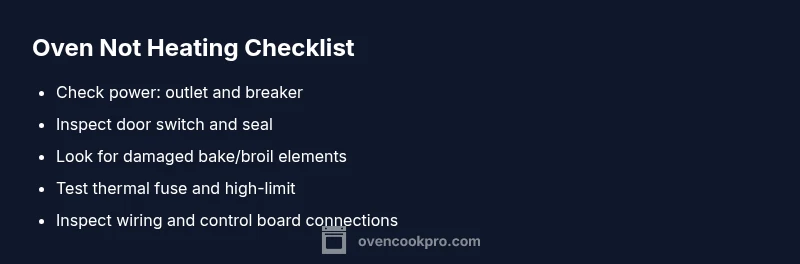
When your oven won’t heat, the most likely culprit is power or a blown fuse. Start by verifying the outlet and breakers, then confirm the oven door switch is engaged. If power is solid, test the bake and broil elements for visible damage. If the issue persists, follow the diagnostic flow below and consider pro help.
Why your oven isn't heating up
If you’re wondering what to do when oven is not heating up, start with the basics. According to Oven Cook Pro, the most common causes are power issues or safety interlocks rather than a mysterious internal fault. Before you dive into complex diagnostics, you can rule out the simplest explanations that homeowners can address in minutes. Check that the oven is plugged in, the outlet works, and the circuit breaker is not tripped. If your clock is running but the oven isn't, the appliance may not be receiving the correct voltage or the door switch may be preventing heat buildup. Based on Oven Cook Pro research, power problems are a frequent culprit, especially in kitchens with older wiring or outdated circuits. Once power is confirmed, inspect the door latch and gasket to ensure the unit can heat evenly. Then move to the element and fuse checks described in later sections.
This section lays the groundwork for a fast, safe diagnosis. You’ll learn to separate simple power-related causes from more involved component failures, so you can act quickly or seek professional help as needed.
Immediate safety checks you can perform safely
Safety first. Do not attempt to service live components. Unplug the oven and switch off the circuit breaker before inspecting any part of the oven interior. Allow the oven to cool completely. Do not touch heating elements or wiring while energized. Use a non-contact voltage tester or a multimeter only if you are comfortable and confident working with electrical components. If you smell burning, notice scorching, or see melted insulation, stop immediately and call a professional. These checks help you rule out obvious issues without risking injury.
Diagnosing heating elements and thermostat
Heating elements (bake and broil) are the most common failure points. Look for visible damage like blistering, cracks, or breaks in the element's sheath. If you see damage, element replacement is typically required. A failed thermostat or temperature sensor can also prevent the oven from reaching the set temperature. If you have access to a multimeter and know how to use it, test for continuity across each element and the sensor. Remember: even when there’s no obvious damage, a faulty control board or temperature sensor could keep the oven from heating correctly. Our tested approach prioritizes simple visual checks before electrical tests.
Based on Oven Cook Pro analysis, power-related issues remain the leading cause of ovens that won’t heat. Prioritize power and element tests before diving into control-board diagnostics.
Wiring, control board considerations and testing
If power and elements check out, the issue may lie in wiring, a faulty control board, or a bad high-limit thermostat. Check the wiring harness connections at the back of the oven and the internal harnesses for loose terminals or obvious damage. A service manual test can confirm whether the control board is issuing the heat command properly. Fault codes from digital displays, if present, can indicate specific components. If you’re not trained in electronics, avoid probing the control board directly; miswiring can cause further damage. Always consult the manufacturer’s manual or a qualified technician for board-level diagnostics.
A careful, non-destructive inspection can reveal loose connections or degraded insulation. If you suspect a faulty control board, plan for a professional replacement or repair.
When to call a professional and maintenance tips
If you’ve exhausted quick checks and the oven still won’t heat, it’s time to call a qualified technician. Electrical components carry risk, and improper handling can lead to shocks, fires, or further damage. Schedule service promptly if there are signs of burning smells, buzzing noises, or overheating. For ongoing reliability, perform regular maintenance: keep vents clear, replace door seals if damaged, and avoid overloading the electrical circuit with other high-draw appliances. Following a routine, you lessen the chance of repeated heating issues and extend your oven’s life.
For Oven Cook Pro readers, addressing the issue promptly with a structured plan protects you and your home. Regular maintenance and mindful usage reduce the odds of future non-heating scenarios, ensuring your kitchen stays safe and reliable.
Steps
Estimated time: 30-45 minutes
- 1
Power and safety check
Unplug the oven or switch off the circuit breaker. Confirm no power is flowing to the unit while you inspect. Reconnect power only after you’ve completed these steps and are ready to test.
Tip: If you smell burning or see scorch marks, stop and call a pro immediately. - 2
Verify electrical supply
Plug the oven back in and use a non-contact tester at the outlet to verify 120V. If no voltage, the issue is upstream in the circuit or wiring; do not continue without addressing power supply.
Tip: Reset the home circuit and test another nearby outlet to check for a shared circuit problem. - 3
Check the circuit breaker
Inspect the household breaker panel for a tripped breaker. Flip it fully to OFF, then back to ON to restore power to the oven while safe.
Tip: If the breaker trips again, there may be a short or overload in the circuit. - 4
Test door switch and timer
Close the oven door and listen for a click. If the switch doesn’t engage, heat may not be allowed. Check the timer settings and ensure they’re not blocking heat.
Tip: Try opening and closing the door firmly to reseat the switch. - 5
Inspect heating elements
Visually inspect the bake and broil elements for cracks or blistering. If damaged, replace the element. If intact, proceed to electrical testing.
Tip: Handle elements with insulated gloves and allow cooling time. - 6
Check thermal fuse and high-limit
If you can access the thermal fuse or high-limit thermostat, test continuity or replace if open. A blown fuse will prevent any heat from reaching the oven.
Tip: Only perform this step if you are comfortable with electrical testing. - 7
Evaluate control board and sensor
Look for error codes on the control board or sensor readings that are out of range. If codes appear or readings are abnormal, a professional diagnosis is advised.
Tip: Document codes or display messages for the technician. - 8
Test after reassembly
Reconnect all components securely, restore power, and run a bake cycle to see if the oven heats to the target temperature.
Tip: Take note of any abnormal sounds or smells during the test.
Diagnosis: Oven won't heat to the set temperature
Possible Causes
- highPower issue (outlet, circuit breaker, or timing)
- mediumDamaged bake or broil element
- mediumFaulty door switch or thermal fuse
- lowControl board or temperature sensor fault
Fixes
- easyCheck outlet, reset or replace circuit breaker, and confirm power to the oven
- mediumInspect bake/broil elements for visible damage and replace if needed
- mediumTest and replace door switch or thermal fuse if open or blown
- hardConsult a pro for control board or sensor failures and possible recalibration
Questions & Answers
Why is my oven not heating at all?
Most often the issue is power-related or a blown fuse. Start by checking the outlet and circuit breaker, then verify the door switch. If the problem persists, move through the diagnostic steps to identify whether a heating element, fuse, or control board is at fault.
If your oven isn’t heating, start by ensuring power is available and the door switch works. If that doesn’t fix it, follow the diagnostic steps to pinpoint the faulty part.
How can I tell if a bake element is damaged?
Look for visible signs like scorching, cracks, or a broken coil. If you see damage, replace the element. You can also test continuity with a multimeter if you’re comfortable; no continuity means replace.
Check the bake element for visible damage and test continuity if you can. No continuity usually means it needs replacement.
Is it safe to touch the oven internals to diagnose?
No. Always unplug and allow cooling before inspecting. Do not touch heating elements or wiring while energized.
Never touch internals while the oven is powered. Unplug first and only handle cooled parts.
When should I replace the control board or sensor?
Replace or recalibrate only after professional diagnosis confirms a faulty board or sensor. Many ovens require specialized tools and firmware checks.
A professional should confirm a control board issue before replacement, as misdiagnosis is common.
What if power is OK but the oven still won’t heat?
This usually points to a faulty heating element, fuse, or control board. Follow the diagnostic flow and call a pro if needed.
If power is fine but there’s no heat, you likely need to check the element or control components and consider professional help.
Watch Video
Main Points
- Verify power first before other checks
- Inspect heating elements for visible damage
- If power and elements test OK, consider control board or sensor faults
- Call a pro for complex electrical issues
- Maintain your oven to prevent repeat failures