Why is the Oven Light On? A Practical Troubleshooting Guide
Learn why the oven light stays on and how to safely diagnose and fix it. This urgent, step-by-step guide covers common causes, quick checks, and when to call a technician.


Most often, the oven light stays on because a door switch or interior light switch is stuck, keeping the circuit energized. A faulty relay on the control board or a timer glitch can also cause this. If it occurs, power down at the breaker and begin a quick diagnostic: check the door switch, inspect the light switch, and replace the faulty component or call a professional if you’re unsure.
Understanding the symptom: why the oven light stays on
The specific question behind the phrase why is oven light on is more than curiosity—it signals a condition that can waste energy and, in rare cases, affect safety. According to Oven Cook Pro, recognizing this symptom early helps homeowners move from alarm to action. In most homes, the culprit is a switch that has become stuck or misaligned. When the door switch or interior light switch fails to open the circuit when the door opens or when the light should be off, the lamp can stay energized. This keeps the bulb lit even if you’ve powered the oven down, which can be startling and inconvenient. Other root causes include a failed relay on the control board or a timer fault that leaves the circuit closed. By understanding these possibilities, you can target checks quickly and avoid unnecessary part replacements. This guide aims to help you diagnose safely and decide whether a DIY fix is feasible or you should reach out to a pro.
Immediate safety actions and first checks
Safety comes first when the oven light won’t turn off. If you notice the light is on while you aren’t actively cooking, immediately power down the oven at the circuit breaker or unplug the unit if possible. Do not touch heated surfaces or exposed wiring. If you smell burning or notice heat emanating from the control area, stop and call professional support. After power-down, reseal any access panels and ensure the oven is completely de-energized before you begin a physical inspection. Firmware or clock settings can sometimes mimic a stuck light; confirm the clock display is not actively counting down or flashing. These initial checks help you determine whether this is a simple switch issue or something deeper in the control system. Remember: safety first, and when in doubt, contact a licensed technician.
Common causes and how to spot them
The most frequent culprits behind why the oven light stays on are electrical or switch issues. A stuck door switch is a classic offender: you can test by opening the door and listening for the switch click while observing whether the light stays lit. A faulty interior light switch is another possibility; look for a dimmed or jammed switch that won’t return to the off position. A relay on the control board can fail, causing a continuous circuit; this may require a multimeter test or specialist equipment to confirm. A timer or clock fault can also perpetuate power to the light if the control logic fails to turn off the circuit after a cycle. Finally, damaged wiring around the light circuit can keep the power connected, especially if there’s heat exposure or rodent damage. Each cause has distinct symptoms, so documenting when the light turns on and off helps pinpoint the issue.
Diagnostic flow overview
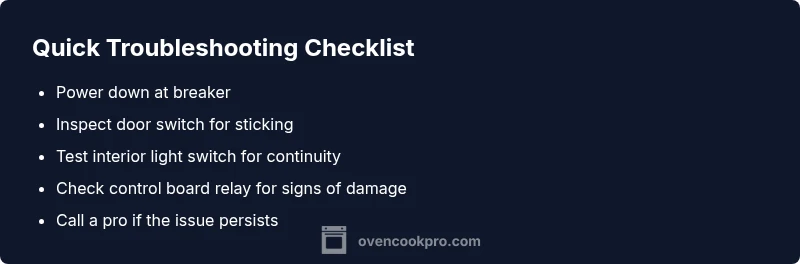
Diagnosing why the oven light is on involves a logical, escalating approach. Start with the simplest, lowest-risk checks and move toward component testing only as you gain confidence. The process typically follows: confirm power is off, inspect the door switch for sticking, test the light switch, inspect the relay or control board for signs of damage, and verify wiring continuity. If at any point you feel unsure, stop and call a professional. Document what you see, including any sounds, clicks, or misalignments, as this information speeds up expert diagnosis. This approach minimizes unnecessary part replacements and ensures safety.
Safe, step-by-step home checks you can perform safely
Begin with non-invasive inspections and basic power cycling. First, cut power to the oven at the breaker and wait a few minutes for the system to reset. Next, remove any accessible panels to expose the door switch and light switch. Check for obvious damage, loose connectors, or signs of overheating. If the light turns off when you open the door, the door switch is likely okay; if it remains on, the switch or relay may be faulty. Use a multimeter to test resistance across the door switch and light switch, replacing any part that shows no continuity when actuated. When you replace a switch or relay, reassemble the panel securely and restore power to test the result. If the problem persists, moving to the control board potential fault is recommended, but this step is best handled by a professional.
When to call a professional and warranty considerations
If basic checks do not isolate the cause or if you uncover obvious damage to wiring, the control board, or internal components, professional help is warranted. A stuck light or faulty relay may seem small, but misdiagnosis can lead to further electrical issues. If your oven is under warranty, contact the manufacturer’s support line before attempting substantial repairs, as unauthorized service can void coverage. Document all symptoms, dates, and steps you’ve taken so far to aid the technician. Professionals can safely test the control board, door switch assembly, and wiring with specialized tools and confirm whether a replacement part is needed.
Prevention and maintenance tips to avoid future issues
Routine maintenance reduces the likelihood of an oven light issue. Regularly inspect door gaskets and hinges to ensure the door seals properly, preventing misalignment that can affect switches. Keep the light bulb clean and replace it only with the recommended wattage to avoid overheating. Schedule periodic inspections of electrical connections in the control cabinet and avoid DIY fixes beyond basic testing. A simple habit—powering down, testing switches, and noting any irregular clock behavior—can help catch issues before they affect everyday use. By applying these best practices, you’ll minimize the chance that why is oven light on becomes a recurring problem.
Steps
Estimated time: 45-90 minutes
- 1
Power down and access components
Begin by turning off power to the oven at the circuit breaker (or unplug if possible) to prevent shock. Remove the access panel to locate the door switch and the interior light switch. Confirm there is no heat or residual charge before touching components.
Tip: Label screws and connectors as you remove panels to ease reassembly. - 2
Test the door switch
With the power off, actuate the door switch by pressing it as the door would close. Listen for a click and observe whether the light remains on. If there is no proper click or the light stays on, the switch is likely faulty.
Tip: If you have a multimeter, test continuity across the switch when pressed and released. - 3
Check the interior light switch and wiring
Inspect the interior light switch for signs of sticking, burning, or loose connectors. Use a continuity tester to verify the switch opens/closes as intended. Replace a defective switch or repair loose wiring.
Tip: Only replace parts with the exact model compatibility and wattage rating. - 4
Evaluate the control board/relay
If the door and light switches test OK, the relay on the control board may be stuck closed. Inspect for visible damage or burn marks. Testing may require professional equipment and expertise.
Tip: Document any unusual noises or lights on the display when you power it back on. - 5
Restore power and test
Reassemble the panels, restore power at the breaker, and test the oven by turning it on and off. Confirm the light behaves normally, including turning off when you open the door or stop cooking.
Tip: Test in different modes (bake, broil) to ensure no residual light behavior.
Diagnosis: Oven light stays on
Possible Causes
- highStuck door switch
- mediumFaulty interior light switch
- mediumFaulty control board relay
- lowTimer/clock fault
- lowDamaged wiring around light circuit
Fixes
- easyPower down at breaker and allow the system to reset
- easyTest the door switch for proper operation and replace if stuck
- mediumInspect/replace the interior light switch or light relay on the control board
- hardCheck wiring for damage and repair or replace as needed
- hardIf unresolved, have a qualified technician diagnose and replace the control board
Questions & Answers
Why does my oven light stay on after I turn it off?
A stuck door switch, faulty interior light switch, or a failed relay on the control board are common reasons. A timer fault can also keep power applied to the light. Start with power-down and switch checks to isolate the cause.
A stuck switch or failed relay is usually the cause. Start with safe power-down and switch checks to identify the problem.
Is it safe to use the oven when the light is on?
In most cases, it's safe, but it can indicate an electrical fault. Avoid using high-heat settings until the issue is diagnosed, especially if you notice overheating or unusual smells.
It's often safe, but get it checked before using high heat; stop if you notice heat or smells.
How can I test the door switch myself?
With power off, press the door switch and listen for a click while observing light behavior. If the light stays on, test the switch with a continuity tester or multimeter to confirm failure.
Test the door switch by pressing it and listen for a click; use a meter to check continuity.
When should I call a professional?
If basic tests don't locate the fault or wiring/board damage is suspected, call a licensed technician. This reduces risk of shock and ensures correct part installation.
Call a professional if wiring or control board issues are suspected.
Can a clock or timer fault cause the light to stay on?
Yes, a faulty timer or clock can keep the circuit closed. If the problem aligns with timer behavior, a professional diagnosis is recommended.
Yes, timer faults can cause it; if timing seems off, get a professional check.
Watch Video
Main Points
- Identify the root cause before replacing parts.
- Power down safely and test switches first.
- Document symptoms to speed up professional diagnosis.
- Call a pro if unsure or if wiring/board work is required.