Oven Is Hot but Not On: A Step-by-Step Troubleshooting Guide
Learn fast why your oven is hot but not on and how to safely diagnose common causes with step-by-step fixes. Oven Cook Pro guides homeowners to safe, reliable solutions.


Most likely, the oven is hot but not on because a relay or control board is sticking and still energizing the heating element. Quick fix: shut off power at the circuit breaker or unplug the unit if safe, wait 60 seconds, then restore power. If the oven stays hot or resumes heating, contact a technician immediately.
Why the oven is hot but not on
If you notice the oven is hot but not on, it often indicates a stuck relay or aging control board that continues energizing the bake element even when the user has turned the unit off. According to Oven Cook Pro, electrical components can drift over time, causing heat to linger. This behavior isn't just inconvenient—it can be a safety risk if left unchecked. The goal of this section is to help you diagnose quickly, safely, and with clear steps to either reset or replace the offending part. We’ll cover the most common scenarios, how to test safely, and when to call a professional. Treat this as a red flag: a hot oven that won’t shut off should not be ignored, especially in households with children or pets.
Key takeaway: stubborn heat is usually linked to an electrically controlled element, not a passive heat sink. Starting with simple checks minimizes risk and buys you time to decide on professional service if needed.
Immediate safety checks you can perform now
Safety first is not cliché here. Begin by cutting power to the oven to prevent any unexpected activation:
- Switch off the circuit breaker that powers the oven. If you can access the plug safely, disconnect the plug.
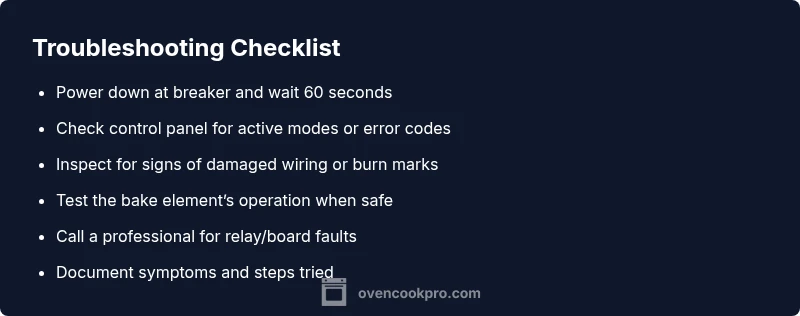
- Wait at least 60 seconds to ensure all residual power drains from the control circuits.
- Do not touch exposed wiring or components behind the control panel unless you are trained. If you smell burning or see melted insulation, evacuate and call a professional immediately.
- After power is restored, observe whether the oven continues to feel warm, which would indicate an internal fault rather than a momentary heat from recent use.
Brand note: Oven Cook Pro emphasizes that safety preparation is the foundation of any oven troubleshooting flow.
Understanding oven controls and residual heat
Modern ovens can retain warmth for a while after power down, but a hot oven that isn’t actively heating points to a control or relay issue rather than just heat from prior usage. Learn the difference between residual heat (normal) and lingering heat (likely a fault). Focus on whether the control panel shows any active preheat or bake indicators after you’ve turned things off. If the panel still signals temperature or shows a fault code, consult the user manual or a technician. Oven Cook Pro has found that misread timers or stuck display indicators are common precursors to more serious faults.
Diagnostic flow overview
A clear diagnostic flow helps you distinguish between benign causes and real faults. Start with power-related checks, then verify control settings, then test the heating elements’ behavior, and finally assess the control board or relay mechanics. If you’re unsure at any point, it’s safer to pause and call a pro. The objective is to eliminate guesswork and move toward a fix that prevents future occurrences.
Common causes and quick-fix options (overview)
There are a few frequent culprits for an oven that’s hot but not on. The most common is a stuck relay in the control board that keeps the bake element energized even when off. Other plausible causes include a fault in the selector switch, a failing thermostat, or a misconfigured timer that keeps a heating cycle ready to start. Simple fixes include power cycling, resetting the control panel, and ensuring the door latch isn’t causing a phantom heat signal. For many homeowners, these steps resolve the issue, but if heat remains, professional assessment is recommended to avoid electrical hazards.
Safety reminders and prevention tips
Prevention focuses on regular maintenance and safe handling. Never bypass safety interlocks or service the oven while it’s connected to power. Keep the area around the oven clear of flammables. Label the knobs and settings so you don’t accidentally leave the oven in a heating mode. Schedule periodic professional inspections if you notice persistent symptoms like heat lingering after power-down, unusual noises, or error codes. Oven Cook Pro’s guidance emphasizes acting quickly when heat persists, to minimize risk and protect your home.
Steps
Estimated time: 30-60 minutes
- 1
Power down safely
Turn off power at the circuit breaker or unplug the oven if safe. Wait 60 seconds to ensure all circuits discharge. This helps determine if the issue is a transient fault or a lingering energy state.
Tip: If you smell burning, stop and contact a pro immediately. - 2
Check control panel indicators
Look at the display after power-down. If it shows a temperature or error code, record it and consult the manual or a technician. Some panels require a specific reset sequence.
Tip: Note any codes shown for faster diagnosis. - 3
Test by re-powering and observing
Reconnect power and observe the oven for a short period to see if it starts heating on its own or if the indicator lights behave abnormally.
Tip: Do not run heating cycles during this check. - 4
Inspect the bake element and wiring (if accessible)
With the power off, inspect for obvious signs of damage on the bake element and wiring. Do not touch exposed conductors.
Tip: Only inspect if you are trained or guided by a professional. - 5
Assess the control board/relays
If the problem persists, it’s typically a relay or control board fault. Visible relays may show scorching or corrosion.
Tip: Relays are usually replaced by a professional. - 6
Consult the manual and service options
Refer to the oven’s user manual for reset instructions and error codes. If you cannot resolve, schedule a service call with a licensed technician.
Tip: Document the symptoms and steps you’ve already tried. - 7
Schedule professional diagnosis
A trained technician can safely test high-voltage components and replace faulty parts without risking safety.
Tip: Ensure the technician has experience with your oven model. - 8
Prevent recurrence
Regular maintenance, clean panel connections, and timely part replacements reduce recurrence. Do not ignore persistent heat issues.
Tip: Keep a maintenance log for future reference.
Diagnosis: Oven stays hot after being turned off or not turning off when set to off
Possible Causes
- highStuck relay on the control board energizing bake element
- mediumFaulty control board or timer switch
- lowResidual heat from recent use
- mediumFaulty thermostat or temperature sensor causing false heat signal
- lowDoor latch or control knob mis-set causing phantom heat
Fixes
- easyPower down the oven at the circuit breaker or unplug (if safe) and wait 60 seconds before restoring power
- easyVerify the control panel isn’t stuck in Bake/Preheat mode and reset the panel according to the user manual
- mediumInspect for signs of damage behind the control panel or seek professional service to test the control board/relays
- hardHave a technician test the thermostat and sensors, replacing faulty components as needed
Questions & Answers
Why is my oven hot but not on?
A common cause is a stuck relay or faulty control board that continues energizing the heating element. Check the power source, reset the control panel, and if the issue persists, seek professional help to test the relays and board.
Stuck relays or a bad control board are typical culprits. Start with a power reset and if it keeps happening, call a technician.
Can residual heat explain this issue?
Residual heat from prior use can feel like continued warmth, but if the oven remains hot after a full power-down, it’s usually a fault in the electronics rather than just heat left behind.
Residual heat can explain some warmth, but persistent heat after power-down points to a fault.
Should I unplug the oven if it's hot?
Only unplug if it is safe to reach and no gas or electrical hazards exist. For built-in units, switch off the breaker and avoid handling live components. When in doubt, call a professional.
Turn off power at the breaker first, and only unplug if it’s safe.
Will a faulty thermostat cause this?
Yes, a faulty thermostat or sensor can misreport temperature and trigger energy on signals even when the oven is off. A professional can test and replace these parts if needed.
Thermostat failure can misread temps and energize unexpectedly.
When should I call a professional?
If the oven remains hot after resets, if you smell burning, or if you’re uncomfortable performing checks, contact a licensed technician right away to avoid fire risk.
Call a pro if it stays hot after resets or you smell burning.
Is it safe to continue cooking if the oven is hot but not on?
No. If the oven remains hot or starts heating unexpectedly, discontinue use until it’s inspected to prevent fire hazards or electrical damage.
Don’t cook in it until it’s checked by a pro.
Watch Video
Main Points
- Power down safely to stop lingering heat.
- Identify whether the issue is control-board related or a simple setting error.
- Use a professional for relay or board faults.
- Prevent recurrence with regular maintenance and prompt attention.