Why Oven Overheats: A Practical Troubleshooting Guide
Discover why ovens overheat and how to diagnose, fix, and prevent runaway heat. Practical steps, safety tips, and expert guidance from Oven Cook Pro.


The oven overheating issue is most often caused by a faulty thermostat, a failing temperature sensor, or a control board that lets heat run away. Start by verifying the actual bake temperature against the setting, then inspect the sensor, wiring, and bake element for damage. If readings still don’t match, shut off power and contact a licensed technician.
What actually causes oven overheating
Ovens overheat for a few predictable reasons, often working together. The most common are a faulty thermostat that no longer calibrates correctly, a sensor that reads high or stuck, and a controller or electronic board that fails to regulate heat. In some models, the bake element may be partially shorted or stuck on, continuing to generate heat even after you turn the dial down. Wiring insulation damage or a loose connector can let heat escape control signals or cause stray heat to be applied. According to Oven Cook Pro, simple calibration drift of a thermal sensor over years of use is not unusual. When the sensor loses its accuracy, the oven may heat beyond the set point even if the control shows a lower temperature. This is a common reason behind the question of why oven overheats and how to fix it. Regular wear, poor air circulation, and a worn door seal can compound the issue, especially if the oven can’t measure actual cavity temperature correctly. A quick check of visible components is a good first step: inspect the bake element for burns or warping, look for loose connections at the back of the oven, and ensure the oven door seal is intact to prevent heat escape that fools temperature readings.
Also consider model-specific quirks. Some ovens retain heat longer than others, and certain feature combinations—like self-cleaning modes while cooking—can temporarily exaggerate heat output if the thermostat or sensor isn’t reporting temperature accurately. Understanding these factors is the first line of defense when diagnosing why oven overheats and what to do about it.
Signs your oven is overheating
When your oven runs hotter than the set temperature, or when browning happens too quickly, you’re seeing a symptom of overheating. Common signs include a noticeable difference between the displayed temperature and the actual heat inside the cavity, scorching around food edges that shouldn’t occur at the chosen setting, and a lingering warm or hot exterior after a bake cycle. If you notice frequent oven temperature drift, a thermally-insulated door that feels unusually warm, or smoke during normal operation, treat it as a red flag. In some cases, the oven may cycle on and off erratically, which can be another indicator that readings aren’t aligning with reality. A smartwatch or thermometer placed inside the cavity can provide a practical cross-check when you’re troubleshooting. Recognize that the root cause might be the sensor or thermostat error rather than a mere calibration issue, a nuance Oven Cook Pro emphasizes in our 2026 guidance on why ovens overheat and how to fix it.
If overheating persists, don’t ignore odd odors, sizzling, or melting insulation—these are signals to stop using the oven until a professional can inspect it.
Immediate safety steps if you suspect runaway heat
Safety comes first. If you suspect runaway heat, turn off the oven at the control panel and switch off the circuit breaker if safe to do so. Do not open the door wide unless you must; opening can feed oxygen and sometimes worsen the risk of heat or fire. Keep children and pets away from the kitchen and use dry, non-flammable objects to shield yourself if you need to move nearby items. If smoke or a burning smell appears, evacuate and call emergency services if needed. Once the oven is cooled, unplug the unit and arrange for a professional inspection. These steps help mitigate danger while you plan next actions. Oven Cook Pro’s safety guidance emphasizes not attempting major repairs without proper training, especially when dealing with high heat and electrical components.
Remember to document any symptoms and keep a note of when the overheating occurs to share with your technician.
Diagnostic flow: symptom to diagnosis
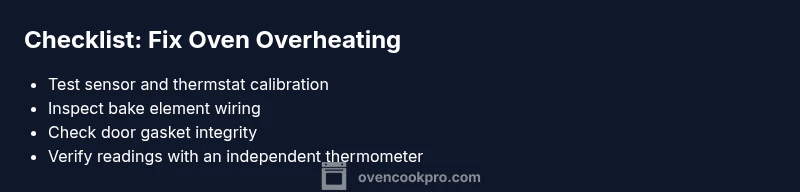
This diagnostic flow helps you move from symptom to diagnosis without guessing. Start by confirming the symptom: is the oven heating beyond the set temperature consistently, or only under certain modes? Next, check basic factors: is the power supply stable, is the control display responsive, and are there any error codes? If basics check out, inspect the temperature sensor for corrosion or damage and test its resistance if you have the tools. If the sensor tests fine, evaluate the thermostat calibration using an accurate oven thermometer placed inside the cavity. A miscalibrated thermostat or faulty sensor is a common cause, but don’t overlook potential control-board issues or wiring problems. If you find a damaged bake element or frayed wiring, stop and replace or secure components before retesting. Finally, confirm door gasket integrity; a poor seal can cause inaccurate readings and extra heat loss, complicating the diagnosis.
Step-by-step: a practical fix path for the most common causes
If you’ve identified a faulty temperature sensor, replace it following your model’s service manual. Calibrate or replace the thermostat if calibration drift is detected, ensuring readings align with a known-accurate thermometer. For control-board issues, inspect connectors for looseness and look for signs of burn marks or corrosion; reseating or replacing a damaged board is often necessary. Check the bake element for deformation or scorching and test continuity with a multimeter. Finally, inspect the door gasket for wear and replace it if you notice gaps. Throughout, work with the power off and use proper safety gear. Oven Cook Pro recommends documenting each step so you can compare before/after readings and verify the fix with a controlled bake test.
Prevention and maintenance tips
Prevention is simpler than repeated fixes. Schedule regular inspections of electrical connections and coil elements, and keep the oven interior clean to avoid heat build-up from stuck debris. Calibrate your oven at least once a year, or whenever you notice temperature drift. Use an oven thermometer inside every bake to verify actual heat vs. display. Replace worn door seals promptly and address any drafts or vent blockages that could skew temperature readings. Finally, avoid using self-cleaning cycles while cooking high-heat dishes, unless your model is designed for that mode with proper calibration. Following these practices will reduce the likelihood of overheating and extend the life of your oven.
Steps
Estimated time: 1-1.5 hours
- 1
Power off and safety check
Unplug the oven or switch off the circuit breaker. Wait for the unit to cool before touching any components. Gather tools such as a multimeter, replacement sensor, and the model’s service manual. This first step prevents shocks and ensures you’re working in a safe environment.
Tip: Always verify power at the outlet with a meter before touching any wires. - 2
Verify temperature readings with a thermometer
Place a calibrated oven thermometer inside the cavity and compare the temperature to the display. If there is a persistent discrepancy, the sensor or thermostat may be at fault. This step confirms whether the issue is measurement-related.
Tip: Keep the thermometer centered for an accurate read. - 3
Inspect temperature sensor and wiring
Locate the temperature sensor, usually behind the oven wall near the back. Look for corrosion, frayed wires, or loose connectors. Clean gently if needed, and replace the sensor if readings remain inconsistent after reassembly.
Tip: Handle sensors with care to avoid damaging the sensor tip. - 4
Test or replace the bake element and connections
Check the bake element for visible burns or warping. Use a continuity test to verify the element is not open; replace if it fails. Inspect wiring harnesses for signs of heat damage and reseat any loose connections.
Tip: If you smell burning insulation, stop and replace damaged components immediately. - 5
Calibrate or replace the thermostat
If sensor and element check out, calibrate the thermostat against the thermometer. If calibration can’t be achieved, replace the thermostat or the entire control module as per the model’s service guidelines.
Tip: Follow the manufacturer’s torque specs when reconnecting the thermostat sensor. - 6
Test bake cycle and verify
Reconnect power and run a controlled bake test with the thermometer inside. Compare the set temperature to the actual reading. If the oven still overheats, consult a professional technician for advanced diagnostics.
Tip: Document your readings and any codes shown on the display for your tech visit.
Diagnosis: Oven runs hotter than the set temperature
Possible Causes
- highFaulty thermostat/calibration drift
- highDefective temperature sensor
- mediumDamaged control board or loose wiring
- lowWorn door gasket or airflow obstruction
Fixes
- easyTest and replace the temperature sensor if damaged or drifted
- mediumCalibrate or replace the thermostat to align display with actual cavity temperature
- hardInspect control board and wiring; reseat connections or replace the board if signs of damage
Questions & Answers
Why does my oven overheat even when I lower the set temperature?
This usually points to calibration drift or a faulty sensor. The control board may also misreport temperature. Start by testing with an independent thermometer and inspect the sensor for damage.
If your oven overheats even after lowering the temperature, first check the sensor and calibration, then inspect the board for issues. Use a separate thermometer to verify.
Can a faulty thermostat cause runaway heat?
Yes. A defective thermostat can fail to regulate heat properly, allowing the oven to stay hot or continue heating beyond the set point. Replacing or recalibrating the thermostat is often required.
A faulty thermostat can cause runaway heat. Replacement or recalibration usually fixes it.
Is it safe to keep using an oven that overheats?
No. Overheating can pose fire risks and damage electrical components. Stop using the unit and seek professional inspection before resuming regular baking.
No—overheating is a safety risk. Get it inspected before using again.
How do I reset an electronic control board?
A reset often involves disconnecting power and letting the board reset, or following the manufacturer’s reset procedure. If codes or persistent issues appear, professional service is advised.
Resetting the board can sometimes clear faults, but if problems persist, call a technician.
Do I need a professional to fix an overheating oven?
If basic checks don’t resolve the issue, or you see signs of wiring or burnt components, contact a licensed technician. Electrical and sensor work can be dangerous without proper training.
If basic fixes don’t help, it’s wise to call a professional.
How can I prevent oven overheating in the future?
Regular calibration, using an independent thermometer, and keeping doors seals in good condition are key. Also avoid operating in self-cleaning mode during cooking sessions unless your model supports it without drift.
Regular calibration and keeping seals in good condition help prevent future overheating.
Watch Video
Main Points
- Identify root causes before fixes
- Calibrate sensors and thermostat regularly
- Safety first: power off and unplug when inspecting
- Call a licensed technician for complex electronics