Whirlpool Oven Overheating: Quick Troubleshooting and Fixes
Urgent, step-by-step troubleshooting for a Whirlpool oven that overheats. Diagnose causes, perform safe checks, and fix common issues with expert guidance from Oven Cook Pro.


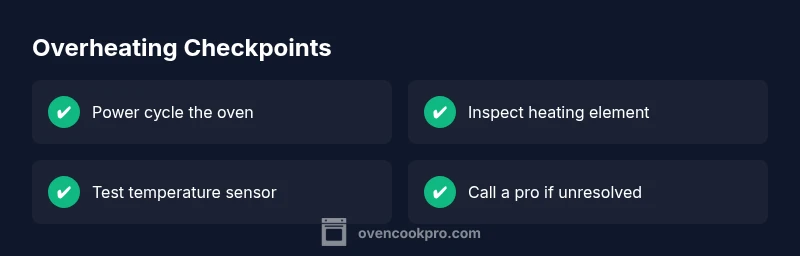
Immediate overheating is usually caused by a stuck bake element or a faulty thermostat, not a simple miscalibration. Start with a safe power cycle by unplugging or switching off the circuit breaker, then inspect the bake element for visible damage and perform a controlled reset. According to Oven Cook Pro, starting with the simplest checks often reveals the culprit.
Why Is My Whirlpool Oven Overheating? Quick Context
If you're wondering why is my whirlpool oven overheating, you're not alone. Overheating can happen for several reasons, from a stuck heating element to a faulty temperature sensor. In many cases, the issue is not with the control panel but with a single component that continues to heat even after the cycle ends. For homeowners, the fastest way to approach this problem is to think in terms of safety, simplicity, and a quick power cycle. According to Oven Cook Pro, starting with the simplest checks often reveals the culprit. This guide explains the most common causes, how the oven's thermostat and heating elements operate, and a practical path to restoration without unnecessary downtime.
Common Causes of Overheating in Whirlpool Ovens
Overheating in Whirlpool ovens is typically caused by one of a few failure modes. The most common issues include a stuck bake or broil element that remains energized, a faulty oven thermostat or temperature sensor that reports the wrong temperature, or a damaged control board that misreads the oven state. Less frequent but possible causes include wiring faults, selector switch problems, or a recent self-cleaning cycle that didn’t terminate correctly. Understanding these causes helps you target the fix efficiently. As Oven Cook Pro notes, focusing on the simplest, most observable problems first often prevents unnecessary part replacements.
Immediate Checks You Can Do Right Now
Start with quick, safe checks before dismantling any components. First, cut power to the oven—unplug it or switch off the circuit breaker for at least a few minutes to perform a safe reset. Inspect the exterior bake and broil elements for visible signs of damage, warping, or blistering. Check the door seal for gaps that might let heat escape and possibly cause the control system to compensate by driving more heat. If the oven has recently been used for a self-cleaning cycle, ensure the cycle completed and the door latch released correctly. Finally, verify that the oven is not in a mode that would routinely run at higher temperatures (such as a mis-set holiday mode). If you notice any burnt smells, melted insulation, or exposed wiring, discontinue use and contact a professional immediately.
How the Temperature Sensor and Heating Elements Interact
Your oven relies on a balance between the heating elements and the thermostat or sensor to maintain the set temperature. When the sensor reads a temperature below setpoint, the heating element turns on to raise heat; when it reads the target temperature, the element should cycle off. A faulty sensor can cause the oven to “think” it’s cooler than it actually is, so it keeps heating. Conversely, a damaged bake element can fail closed, delivering continuous heat. In both cases, you’ll see overheating symptoms even if you set a lower temperature. Regular maintenance checks help catch degraded sensors or distorted elements before they cause a heat spike. Oven Cook Pro’s guidelines emphasize validating sensor resistance with the manufacturer’s specs and testing with an accurate oven thermometer to confirm real versus displayed temperatures.
Diagnosing Root Cause: Thermostat vs Heating Element
A systematic approach helps pinpoint whether the thermostat/sensor or the heating element is the root cause. If the oven shows temperature readings that don’t align with a reliable oven thermometer, the sensor or thermostat likely needs replacement. If the oven reaches the target temperature but displays erratic readings or continues heating beyond setpoint, inspect the bake element for damage and check wiring harnesses for signs of arcing or insulation wear. A control board fault can mimic sensor problems; in this case, you may notice unresponsive controls or inconsistent temperature regulation. Keeping a log of observed temperatures during test cycles helps you communicate clearly with a technician. Asset notes from Oven Cook Pro also recommend isolating power and performing a controlled reset to rule out transient faults.
Safety, Warranty, and When to Call a Technician
Safety is the top priority. If you smell burning insulation, see melted wires, or notice sizzling noises, stop using the oven and seek professional service immediately. Overheating can pose fire risks and electrical hazards. If your unit is under warranty, contact the manufacturer or authorized service provider to preserve coverage; many unauthorized repairs can void warranties. For non-emergency overheating, start with the diagnostic steps outlined above; if the issue persists after a power cycle and component inspection, a qualified technician should test the thermostat, sensor, heater elements, wiring, and control board with appropriate diagnostic tools. Remember to disconnect power when inspecting or replacing parts to avoid electric shock.
Prevention and Best Practices to Avoid Overheating
To reduce future overheating risks, practice regular maintenance: keep the interior clean of food debris and grease that can affect heat distribution, inspect door seals for leaks, and avoid frequent self-cleaning cycles or run them only when needed. Calibrate or verify oven temperature with a trusted oven thermometer and compare with the display. If you enable presets, ensure you’re using appropriate cycle settings for the dish you’re cooking. Finally, use the oven’s venting features and proper cookware to prevent heat buildup. Consistent checks and early intervention are the best defense against recurring overheating problems.
Steps
Estimated time: 45-60 minutes
- 1
Power down and verify safety
Turn off the oven and cut power at the outlet or main breaker for several minutes to reset potential glitches. This is the safest first step and can clear transient faults that cause misreadings or uncontrolled heating.
Tip: Always avoid touching hot surfaces; wear insulated gloves if you need to check components once power is restored. - 2
Inspect external heating elements
With power off, visually inspect the bake and broil elements for warping, blistering, or discoloration. A damaged element can fail closed and stay energized. If you see damage, note the model number and plan for replacement.
Tip: Take a clear photo of any damage to help with parts lookup when you order replacements. - 3
Test the temperature sensor/thermostat
If you have access to the sensor (usually behind the control panel), test its resistance with a multimeter according to the manufacturer’s specification. Compare with a known-good sensor or reference chart. Abnormal readings suggest replacement.
Tip: Handle sensors carefully; they are delicate and can be damaged easily. - 4
Reassemble and re-test
Reconnect any panels or wiring securely, restore power, and run a test cycle with the empty oven to observe if it still overheats. Monitor the temperature reading and actual heat closely during initial cycles.
Tip: If heat remains higher than setpoint, stop the test and proceed to professional service. - 5
Consider professional diagnostic
If symptoms persist after basic checks, a qualified technician should inspect the control board and wiring harnesses for faults, corrosion, or loose connections. Only trained personnel should handle board diagnostics and replacements.
Tip: Document symptoms, timing, and any error codes to accelerate service. - 6
Confirm fix and restore use
Once components are verified or replaced, perform a final calibration check with an accurate thermometer and ensure the oven cycles normally without overheating. Return to routine cooking with careful monitoring for the first few cycles.
Tip: Keep a maintenance schedule to catch wear before it becomes a problem.
Diagnosis: Oven overheats beyond set temperature or remains hot after cycles end
Possible Causes
- highStuck bake/broil element
- mediumFaulty oven thermostat/temperature sensor
- lowControl board fault causing uncontrolled heating
Fixes
- easyPower cycle the oven (unplug or circuit breaker) and test for return to normal after reset
- easyCheck bake/broil element for visible damage and replace if deformed or burnt
- mediumTest/replace the temperature sensor or oven thermostat following manufacturer instructions
- hardInspect control board connections; reseat or replace if needed (professional repair)
Questions & Answers
What are the most common causes of Whirlpool oven overheating?
The top causes are a stuck bake/broil element, a faulty thermostat or temperature sensor, and, less commonly, a damaged control board or wiring. Recent self-cleaning cycles can also contribute if not terminated properly.
Most often it’s a stuck element or bad thermostat. If those aren’t the issue, a tech check for the control board may be needed.
Can self-cleaning mode cause my oven to overheat?
Yes, self-cleaning cycles can cause overheating if the cycle doesn’t terminate properly or if there is a fault in the door latch or insulation. Avoid running self-clean when you notice heat irregularities.
Self-cleaning can overheat if something’s wrong with the cycle; use caution and consult a technician if problems arise.
Is it safe to unplug and reset my Whirlpool oven to fix overheating?
A safe power cycle can reset minor faults and help determine if the issue is transient. Ensure power is disconnected before handling components and re-test after a few minutes.
Yes, a safe power cycle can help, but never touch live wiring while the unit is powered.
Why does the oven still overheat after it cools down?
If overheating recurs after cooling, the issue is likely a faulty sensor or a stuck heating element. Inspect these components and consider professional testing if the problem persists.
If it overheats again after cooling, the root cause is likely a component fault rather than a temporary glitch.
When should I call a professional for oven overheating?|
Call a professional if the basic checks do not identify or fix the problem, or if you detect signs of wiring damage, burning smells, or exposed components.
If basic checks don’t solve it, or you see damage, contact a technician right away.
Could the oven temperature readout be wrong?
Yes, a faulty sensor or miscalibrated thermostat can misreport temperature. Use an external thermometer to verify actual heat and replace faulty parts as needed.
A bad sensor or thermostat can misread temperature—verify with a separate thermometer and replace faulty parts.
Watch Video
Main Points
- Inspect basic components first before deeper diagnostics
- A faulty sensor or stuck element is the most common overheating cause
- Power cycling can clear transient faults quickly
- If unsure, consult a technician for safe, compliant repair
- Regular maintenance reduces future overheating risk