Why is My Oven Beeping? Urgent Troubleshooting Guide
An urgent, step-by-step troubleshooting guide to stop oven beeps and identify if a timer, sensor, or fault code is involved. Learn safe checks, read patterns, and when to call a pro for reliability.


Most oven beeps are either a normal reminder or a simple fault. The fastest fix is to identify whether a timer is active, the door is closed, or a sensor has triggered an alert. Start with a power cycle, then check active timers and the door latch. If the beep persists, reset the control panel and consult the manual or a pro.
What the beep means in plain language
Oven beeps are not random. In most models, a single chime can mean a timer or preheat is done, while a rapid sequence or continuous beeping signals an alert or fault. Understanding the difference helps you respond quickly and safely. Determine recent actions: has a timer been set, did preheating finish, is the door ajar, or did a sensor trip? Referring to your model's manual often clarifies the exact pattern. According to Oven Cook Pro, this initial interpretation lays the groundwork for effective troubleshooting.
Distinguishing beeps by cadence
Cadence matters. A light, single ding may indicate a completed cycle or reminder, while a rising cadence or continuous beeping usually signals an alert or fault. Some ovens use distinct patterns to indicate a door latch issue, a sensor fault, or a control board warning. If you notice a familiar pattern that matches your manual, you can act quickly without guessing. Oven Cook Pro analysis emphasizes that recognizing cadence reduces unnecessary service calls and speeds up safe resolution.
Quick checks you can do now
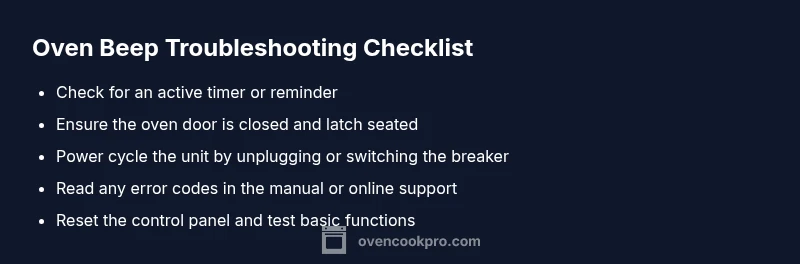
Before you panic, run through these quick checks:
- Confirm there is no active timer or reminder in the oven's display.
- Verify the door is fully closed and the latch engages properly.
- Power cycle the unit: unplug for 60 seconds or switch the circuit breaker, then plug back in.
- Check for any visible fault codes or blinking lights on the control panel.
- If you still hear a beep, reset the control panel from the settings menu and re-test basic functions. These steps are simple, low-risk, and often resolve common beeping issues.
Reading patterns and error codes
Not all ovens use numeric fault codes; some rely on beep cadences or LED indicators. If your oven does display codes, consult the user manual or the manufacturer’s online support to translate them. Document the sequence of beeps (e.g., count, duration, and whether it stops after a power cycle) to aid a technician. Keep in mind that some beeps are environmental (power fluctuations, temp sensor warm-up) and not indicative of a dangerous fault.
Diagnostic flow you can follow
A practical approach helps you avoid random guesses:
- Symptom: Beep pattern observed (single chime, rapid beeps, continuous alarm).
- Diagnosis: Timer/reminder, door latch issue, sensor fault, or control board glitch.
- Fixes: Clear timers, ensure door is closed, reset the panel, or power cycle. If unresolved, escalate to professional service. This flow mirrors common OEM guidelines and reduces time to resolution.
Most common causes and how to fix them
The most frequent reasons for oven beeps:
- Active timer or reminder: cancel all timers and alarms.
- Door latch or sensor fault: ensure door is fully closed and latch engages; inspect for obstruction.
- Temperature sensor or probe issue: a short or fault can trigger alarms; consult the manual for sensor testing steps.
- Control board glitch: a simple reset often clears it; if the beep returns, professional service may be needed.
- Electrical irregularities: power surges can trigger odd beeps; ensure stable power and avoid plugged-in devices near the oven. Fixes range from easy to professional, but start with the lowest-risk steps first.
Safety first: when to stop and call a pro
If you notice burning smells, smoke, signs of overheating, or if beeps persist after all basic resets, turn off the oven, unplug if safe, and contact a qualified technician. Do not attempt to bypass safety features or disassemble internal components. Prioritize personal safety and electrical safety whenever you work near an appliance.
Prevention tips to reduce future beeps
Preventive steps save time:
- Schedule regular maintenance checks and keep your oven’s firmware up to date if it’s a smart appliance.
- Use the manual’s service tips for routine sensor cleaning and latch inspection.
- Create a simple checklist for timers and door status before using the oven.
- Reset the panel after any pantry or kitchen changes to avoid unexpected beeps. Oven Cook Pro recommends brief, quarterly checks to minimize future beeps and ensure reliable operation.
Steps
Estimated time: 30-60 minutes
- 1
Power cycle the oven
Unplug the oven or switch off the circuit breaker for about 60 seconds. This clears most transient issues and resets the control logic.
Tip: Label the breaker so you don’t forget to switch it back on. - 2
Check timers and reminders
Review the display for any active timers or reminders. Cancel or clear them to stop non-safety beeps.
Tip: Even small timers can trigger audible alerts long after you expect. - 3
Inspect the door latch and seal
Make sure the door shuts fully and the latch engages. A misaligned latch can cause repeated beeps.
Tip: Gently press around the door edge to check for misalignment or debris. - 4
Read any error codes or indicators
If present, note the pattern or code and consult the manual or manufacturer support to interpret it.
Tip: Keep a log of codes and corresponding symptoms. - 5
Reset the control panel
Access the settings or service menu per your model’s manual, then perform a soft reset.
Tip: A soft reset often resolves temporary glitches. - 6
Test basic function after reset
Preheat briefly and observe if the beep occurs again. If it does, continue with professional guidance.
Tip: Document the beeps during testing for technician reference.
Diagnosis: Oven beeping with a display message or irregular pattern
Possible Causes
- highPower issue or irregular electrical supply
- highActive timer or reminder
- highDoor latch or sensor fault
- mediumControl panel fault or sensor failure
- lowUnknown fault code requiring service
Fixes
- easyCheck outlet and power, then power cycle the oven
- easyCancel all timers/reminders and close the door latch
- easyInspect door latch and sensor for obstruction or misalignment; reseat if needed
- easyReset the control panel by power cycling and re-test functions
- mediumIf beep continues, contact a certified technician for a diagnostic
Questions & Answers
Why is my oven beeping after preheating?
Beeping after preheating is often a timer or alert signal, or sometimes a fault code. Check for active timers, verify the door is closed, and reset the control panel. If it continues, consult the manual or contact support.
If it beeps after preheating, look for an active timer or alert, then reset the panel. If it keeps beeping, check the manual or contact support.
What do different beep patterns mean?
Different cadences typically indicate reminders, alerts, or faults. A single chime often means a timer or ready state; rapid or continuous beeps point to an alert or fault requiring action.
Cadences help you tell if it’s a reminder or a fault. Start with timers, then doors or sensors.
How can I stop the beeping without turning off the oven?
Cancel any active timers or alarms, ensure the door is closed, and perform a soft reset of the control panel. If it persists, consult the manual or a technician.
Cancel timers and reset the panel to stop the beep. If it continues, check the manual or call a pro.
Are beeps dangerous or a sign of fire?
Beeping is rarely dangerous, but you should watch for signs of overheating, smoke, or burning odors. If you see or smell danger, power down and seek help immediately.
Beeping isn’t usually dangerous, but if you smell smoke or see heat, stop and call for help.
Should I call a technician for every beep?
Not every beep requires a technician. If resets clear the beep and there are no fault codes, you may not need service. If it repeats or fault codes appear, contact a technician.
Only call a pro if it keeps beeping after resets or you see fault codes.
Can firmware updates fix beeping issues?
Firmware updates can fix glitches on smart ovens. Follow manufacturer instructions exactly when updating, and only from trusted sources.
Software updates can fix issues, but follow the manual carefully.
Watch Video
Main Points
- Identify beep type and source before acting
- Check timers and door latch first
- Power cycle to reset the control panel
- Consult the manual for error codes
- Call a pro if the beep persists after resets