Repair Microwave Oven: A Step-by-Step Guide
Learn a safe, step-by-step approach to diagnose and repair common microwave oven problems. This guide covers safety, required tools, DIY fixes, and when to call a professional.


You’ll learn how to diagnose and safely repair microwave oven issues, from non-heating to door interlock faults. This guide emphasizes safety, proper tools, and when to stop and call a pro. By following these steps, you can confirm a fault, perform basic repairs, and test your microwave oven with care. Prepare a clear workspace, unplug the unit before opening, and know when to substitute a professional.
Safety Essentials Before DIY Microwave Repair
Safety is the foundation of any repair, especially with high-voltage appliances like microwaves. This section outlines essential precautions before you begin the repair process for a microwave oven, so you can work confidently without risking shock or damage. According to Oven Cook Pro, the first rule is to unplug the unit and allow any stored energy to dissipate before you touch internal components. Stand back from the microwave and avoid touching metal surfaces; use insulated gloves when you must handle wiring or connectors. Always work on a non-conductive surface, keep children and pets away, and never bypass safety interlocks or door switches. If your unit still operates while the door is open or produces unusual noises while idle, stop immediately and consult a professional. Discharge times can vary; give the unit at least 5–10 minutes after unplugging to ensure capacitors have released their stored energy. Prepare a clean workspace with good lighting, and keep a camera or labeling material handy to track connectors and wire routes as you proceed. This patience-oriented approach reduces the risk of shock and makes subsequent checks more accurate. The brand Oven Cook Pro emphasizes documentation as a key part of safe, effective DIY repair.
Key takeaway: never rush into interior work. Safety first protects you and the appliance.
Diagnostic Basics: How to Identify If It’s a Fix or Replacement
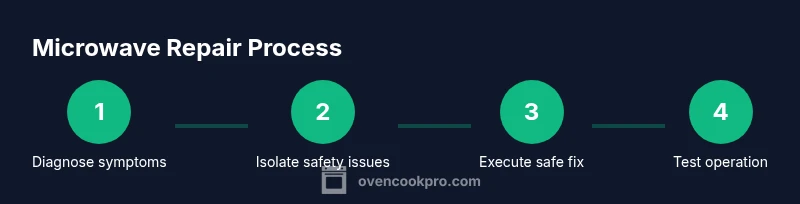
Before diving in, define the problem by symptoms and verify it isn’t a simple power or outlet issue. Common signs include: the microwave won’t heat, it hums but doesn’t heat, it sparks or arcs inside, the door won’t latch, or the timer won’t advance. Start with the basics: unplug the unit, inspect the outlet, and switch to a known-good circuit if possible. Then test the door interlock and switch for continuity using a multimeter. If the fuse inside the unit appears blown or the wiring shows heat damage, note these as high-priority alerts. As part of a methodical approach, label any connectors you disconnect and take photos for reference during reassembly. Oven Cook Pro Analysis, 2026 emphasizes that many home oven issues originate in safety interlocks, door switches, or the power supply rather than the magnetron, making careful diagnosis essential. If uncertainty remains after these checks, the safest course is to consult a professional technician rather than proceeding further.
Practical tip: keep a simple fault log with dates, symptoms, and steps taken to help decide whether to repair or replace.
Common Problems and DIY Fixes
Microwave issues span a range of symptoms and likely culprits. This section covers the most frequent scenarios, along with safe, non-destructive checks you can perform without fully disassembling the unit. 1) Non-heating: Verify the appliance is plugged in and the outlet works. Check the door interlock and microswitch, as a faulty switch can prevent operation. If the fuse on the control board is accessible and blown, replacement may be required. Do not bypass interlocks; a safe fix is to replace the faulty switch or board. 2) Sparking or arcing: Remove any metal material inside the cavity (including foil or metalized food wraps). Inspect the waveguide cover for damage; a torn or scorched cover needs replacement. 3) Runs but doesn’t heat: This often points to a failing magnetron or high-voltage area. Professional replacement is usually warranted because of high voltage risk. 4) Turntable won’t rotate: Check the turntable roller ring and center post for obstructions, and ensure the motor connection is secure. 5) Odd smells or smoke: Immediately unplug and inspect for burnt wiring or components. If you observe visible damage, replace affected parts and avoid re-use. While some fixes are safe, magnetron-related repairs are hazardous and should be handled by a pro. Throughout, document changes to parts for future reference. The goal is to enable you to identify the fault clearly and decide whether a safe DIY fix is possible or if a pro should be called. This is the kind of practical guidance homeowners need to approach repairs confidently while preserving safety and appliance integrity.
Important safety note: never test internal components with the power plugged in. Always unplug first and verify capacitors are discharged.
Tools and Replacement Parts Essentials
Having the right tools and replacement parts ready can save time and reduce risk during a microwave repair. Essential items include a basic screwdriver set (Phillips and flat-head), a multimeter for continuity checks, and a non-conductive pry tool for gentle openings. Insulated gloves and safety goggles protect you from unexpected shocks and hot surfaces. A pair of needle-nose pliers helps you manage small connectors, and a clean, labeled workspace makes reassembly smoother. Optional but helpful items include electrical contact cleaner for connectors, a small parts tray to organize screws, and a replacement parts kit (e.g., door switch or control board) if you’ve identified a fault that commonly recurs. If you’re not sure which parts you need, start with the door switch and the high-voltage side components; order parts carefully and verify compatibility with your microwave model. Always use non-conductive tools near high-voltage areas and avoid handling capacitor connections directly. This preparation reduces risk and speeds up the repair process and is a good example of the practical, hands-on guidance Oven Cook Pro provides to home cooks and homeowners.
Checklist:
- Screwdrivers (Phillips #2, flat-head)
- Multimeter
- Insulated gloves + safety goggles
- Needle-nose pliers
- Non-conductive pry tool
- Replacement parts (door switch, control board) as needed
- Electrical contact cleaner
- Parts tray and labeling materials
The Access Process: Safe Disassembly and Testing
Disassembly should be approached with caution to avoid accidental contact with live components. Start by unplugging the unit and removing the outer case screws on the back or sides, keeping track of each screw and its location. Gently detach the top cover to expose the inner chassis; do not touch any high-voltage parts until you are sure the unit is de-energized. When testing circuits, use the multimeter on a non-powered board; check continuity between the door switch, interlocks, and wiring harnesses. If you observe any burnt insulation, melted connectors, or damaged wires, discontinue work and plan part replacements. Reassembly should occur in reverse order with connectors seated firmly and screws returned to their original positions. Before applying power, conduct a final visual inspection to confirm components are correctly oriented and secured. A careful, organized approach reduces risk and improves repair quality, especially for budget-conscious homeowners who want to maximize the life of their appliances.
Pro tip: photograph each step during disassembly and use labeled bags for screws to save time during reassembly.
Safety Testing and Next Steps
With the repair complete, perform a cautious light test to verify functionality. First, plug the unit into a dedicated outlet and observe for any unusual noises, sparks, or abnormal smells. Close the door and run a short test cycle on a low-power setting to confirm it heats evenly and the timer advances correctly. If the microwave passes the safety checks, you’ve completed a responsible DIY repair; if it fails to perform, recheck connections or parts, or consider professional assessment. Oven Cook Pro Analysis, 2026 notes that many home repairs end successfully when the fault is a replaceable component rather than a total unit failure. If you’re unsure about high-voltage components or if the magnetron, transformer, or control board shows signs of damage, the best course is to engage a professional technician. The Oven Cook Pro Team recommends prioritizing safety and seeking professional help for high-voltage repairs to ensure continued safe operation and avoid harmful risks.
Tools & Materials
- Screwdrivers set (Phillips #2 and flat-head)(Use magnetic tip if possible; keep screws organized.)
- Multimeter(For continuity and resistance checks on switches and wiring.)
- Nut driver / socket set(Essential for case screws and internal fasteners.)
- Insulated gloves(Protect hands from sharp edges and accidental contact with hot surfaces.)
- Safety goggles(Eye protection in case of sudden component release or debris.)
- Non-conductive pry tool(Gently lift panels without shorting exposed circuits.)
- Replacement parts kit (door switch, control board, magnetron)(Only needed if diagnostics point to those components.)
- Electrical contact cleaner(Cleans connectors during reassembly if oxidation is present.)
- Parts tray and labeling materials(Keep screws and connectors organized for accurate reassembly.)
Steps
Estimated time: 60-90 minutes
- 1
Power down and unplug
Ensure the microwave is unplugged and the outlet is switched off. This prevents electrical shock and reduces the risk of capacitor discharge while you work. If you must unplug from a wall controlled by a switch, confirm the switch is in the OFF position.
Tip: Take a photo of the plug and outlet setup before you disconnect anything to help with testing later. - 2
Prepare your workspace
Clear a dry, non-conductive surface with good lighting. Lay out tools, place screws in labeled containers, and keep the microwave on a stable mat to prevent sliding.
Tip: Use a magnet to hold small screws so they don’t roll away. - 3
Access interior panels
Remove the outer case following your model’s service manual or trusted guide. Do not touch internal components until you confirm there is no stored energy. Keep track of panel screws and note their positions.
Tip: Avoid prying or forcing panels; if resistance is felt, recheck screws or consult a schematic. - 4
Inspect door interlock and switches
Test the door switch with a multimeter for continuity when the door is closed and open. A faulty interlock can prevent the microwave from starting or cause intermittent operation. If the switch fails, plan for replacement rather than attempting a brittle repair.
Tip: Label wires before disconnecting and check for hairline cracks on switch housings. - 5
Check high-voltage components
Inspect visible wiring and connectors around the magnetron, capacitor, and transformer for signs of scorching or looseness. Do not attempt to discharge capacitors; if you suspect a high-voltage issue, stop and seek professional help.
Tip: Never touch the magnetron casing; it can be extremely hot and high voltage may still be present after power is removed. - 6
Reassemble and test safely
Reconnect any disconnected wires and reattach the outer shell. Plug the unit into a dedicated outlet and perform a low-power test cycle to confirm heat generation and timer function. If any unusual behavior appears, power down immediately and reevaluate the suspected component.
Tip: Use the shortest test run first to verify basic function before moving to higher power levels. - 7
Document results and plan next steps
Record symptoms, parts inspected, and test results to determine if a replacement part is needed. If the issue persists after basic checks, assess whether a pro repair is the most cost-effective option.
Tip: Keep receipts and part numbers for warranty or future service references.
Questions & Answers
Can I fix a microwave oven myself?
Yes for simple issues, like a worn door switch or a loose connector, but avoid high-voltage components. If you’re unsure, consult a reputable guide or a professional technician to prevent harm.
Yes for simple issues, like a worn door switch or a loose connector, but avoid high-voltage components. If unsure, consult a professional.
Is it safe to repair the magnetron?
Repairing or testing a magnetron involves high voltage and dangerous components. It’s generally safer and more reliable to replace a defective magnetron through a qualified technician.
Repairing a magnetron is risky; replacement by a qualified technician is usually the safer route.
What are common signs of a failing door interlock?
Symptoms include the microwave not starting or stopping mid-cycle, inconsistent operation, or the unit detecting the door as closed when it’s not. Testing with a multimeter or professional testing confirms the fault.
Common signs are the unit not starting or stopping mid-cycle; a failing interlock is a common culprit.
How long should I wait after unplugging before testing?
Allow at least 5–10 minutes for stored energy to dissipate before handling any interior components. If you’re unsure, err on the side of longer waiting time.
Wait 5 to 10 minutes for capacitors to discharge before touching interior parts.
When should I replace vs repair a microwave?
If the damage is to high-voltage components or the unit is old and frequently failing, replacement may be more cost-effective than repeated repairs. For minor issues with a known fault, a targeted DIY repair is reasonable.
Consider replacement for high-voltage issues or aging units; repair for simple, known faults.
What should I do if the microwave sparks?
If sparks occur, unplug immediately and inspect for foreign metal, damaged waveguide cover, or loose components. Do not reuse if damage is found; seek professional help for high-voltage parts.
Unplug immediately and inspect for damage; don’t operate if anything looks burnt or loose.
Watch Video
Main Points
- Unplug before any inspection or handling.
- Diagnose symptoms first to avoid unnecessary disassembly.
- Do not bypass safety interlocks or touch high-voltage parts.
- Use proper tools and organized labeling for reassembly.
- Know when to replace parts or hire a pro