Why Won't My Oven Unlock? A Step-by-Step Troubleshooting Guide
Discover why your oven won't unlock and follow a step-by-step, safety-focused troubleshooting guide. Learn common causes, safe resets, and when to call a professional for fast, reliable resolution.


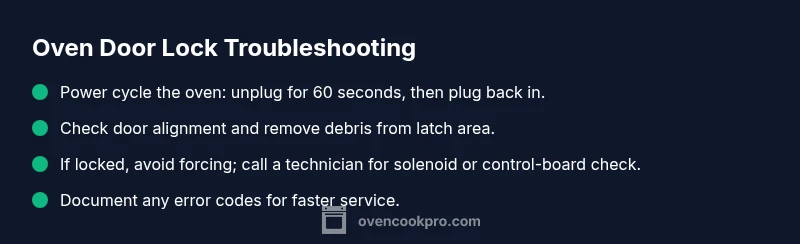
Most oven doors won’t unlock because the lock is engaged (safety or self-clean mode), a power glitch, or a sticky latch. Try a quick reset: switch off the oven, unplug if possible, wait 60 seconds, then power back on and perform the unlock sequence (hold the door handle or press the unlock button). If it stays locked, avoid forcing it and seek professional service.
Why the Oven Lock Fails
Ovens come with built-in locks for safety, especially when a self-clean cycle is active or when a child-safety feature is engaged. The lock is usually a solenoid or motorized latch integrated with the door hardware and control board. When something goes wrong—power glitches, a sluggish latch, or a misaligned door—the lock can become stuck or prevent the door from releasing. According to Oven Cook Pro, most lock-related failures stem from safety interlocks or latch faults rather than a broken door glass. Understanding how the lock works helps you diagnose without triggering more damage. If you hear a faint buzzing or feel resistance when attempting to unlock, treat the situation as urgent and proceed with careful, non-forceful troubleshooting.
Common Scenarios in Home Kitchens
The first step in solving a stubborn oven lock is to identify which scenario matches your situation. Common issues include the end of a self-clean cycle with the lock lingering due to cooldown, a brief power interruption that leaves the control module in an uncertain state, a misaligned door that keeps the latch engaged, or a dirty latch that binds as the door closes. In some models, the display may show an error code indicating a lock fault or a sensor failure. Recognize these patterns: if the oven recently finished self-cleaning or if you notice a buzzing from the lock, you’re likely dealing with a lock/interlock fault rather than a broken hinge.
Safe, Stepwise Troubleshooting You Can Do Now
Proceed with a calm, methodical approach. Start with the simplest steps first and only escalate if needed. 1) Power down: turn off the oven, unplug if feasible, and wait 60–90 seconds to reset the control board. 2) Confirm door alignment: gently open and close the door to ensure it sits evenly and isn’t bent or jammed by residue. 3) Attempt a controlled unlock: with the oven off, press and hold the unlock button or operate the door handle per your model’s manual for 10–15 seconds. 4) Inspect the latch area: look for debris, sticky residue, or a visibly bent latch; clean carefully with a soft cloth. 5) If the lock still binds, do not force it; the next steps require power and potentially disassembly by a professional.
Diagnostic Flow You Can Follow (Overview)
If the previous checks don’t restore release, proceed to a more formal diagnosis: evaluate power and control signals, inspect the lock solenoid’s operation, verify door alignment, and test the lock wiring for continuity. Document any error codes from the display. This sequence helps you determine whether you’re facing a simple reset issue, a mechanical jam, or a faulty control board. Remember, safety first: disconnect power before touching electrical components.
When to Call a Professional and How to Prepare
If the door remains locked after all safe resets, it’s time to contact a technician. Prepare your oven’s model number, recent error codes, and notes about the lock behavior (timing, noises, or resistance). A qualified technician will verify the lock solenoid, latch alignment, and control board, and can replace components if necessary. By arranging a service call promptly, you reduce the risk of further damage and preserve oven safety.
Steps
Estimated time: 20-45 minutes
- 1
Power down safely
Turn off the oven using the control panel. If accessible, unplug the unit or switch off the circuit breaker for 60 seconds to reset the electronics. After the wait, restore power and prepare to test the unlock sequence without applying force.
Tip: If you must unplug, ensure you’re standing on a dry surface and haven’t touched live metal. - 2
Check door alignment
Gently try to lift and re-seat the door to confirm it sits evenly in the frame. Look for warped hinges, loose screws, or visible debris in the door gap that could hinder release.
Tip: Use a flashlight to inspect the latch area for hidden obstruction. - 3
Attempt a controlled unlock
With power restored, hold the unlock button (or follow your model’s unlock sequence) for 10–15 seconds while stabilizing the door with your other hand. Do not force the door if it resists.
Tip: Use the manual if your model has a dedicated unlock procedure. - 4
Inspect the latch and wiring
Visually inspect the latch for sticky residue or corrosion. If you notice damaged wiring or a loose connector at the latch, stop and call a technician. Do not attempt electrical repairs unless you are trained.
Tip: Only open access panels if you are comfortable and the unit is unplugged. - 5
Test post-reset behavior
Power the oven back on and attempt unlock again. If the door releases, monitor for recurring issues in the next few days and document any codes or noises.
Tip: Keep a log of events to share with a technician if needed. - 6
When to escalate
If the lock remains engaged after all non-destructive steps, schedule a professional service call. Replacing the lock mechanism or control board is usually beyond DIY scope.
Tip: Ask about a diagnostic check and warranty coverage if applicable.
Diagnosis: Door won't unlock after self-clean cycle or power cycle
Possible Causes
- highDoor lock/interlock engaged due to safety feature
- mediumPower supply issue or control board reset required
- lowDamaged or stuck locking solenoid or latch mechanism
Fixes
- easyPower cycle the oven: unplug for 60 seconds (or switch off at the breaker if accessible), then plug back in and attempt unlock again
- easyInspect for jammed latch or misalignment; gently move the door and clean debris from the latch area
- mediumIf the door remains locked, contact a certified technician to inspect the lock solenoid, wiring, and control board
Questions & Answers
Why won't my oven unlock after a self-clean cycle?
Self-clean cycles engage a safety lock that can remain engaged until the cooldown completes. If the latch doesn’t release after cooldown and a power reset, a fault in the latch or control board is likely. Avoid forcing the door and seek professional help if it doesn’t release.
Self-clean cycles lock the door for safety, and it may stay locked until cooldown ends. If it won’t release after reset, call a technician.
What should I do first when the door won't unlock?
Start with a safe power cycle: switch off, unplug if possible, wait a full minute, then power back on and try the unlock sequence. Check door alignment and remove any obvious obstruction before proceeding to more advanced steps.
First, power cycle the oven and check for obvious obstructions.
Is it dangerous to force the oven door open?
Yes. Forcing can damage the glass, latch, or hinges and may cause injury. If resistance is felt, stop and contact a professional rather than applying extra force.
Don’t force the door; it can cause injuries or more damage.
Can a faulty latch or lock cause the door to stay locked?
A stuck latch or faulty solenoid is a common culprit. If cleaning and resets don’t free the door, the lock mechanism or control board may need replacement by a technician.
Yes, a bad latch or solenoid often causes the lock.
When should I call a professional?
If the door remains locked after a power cycle, or you hear unusual buzzing or see error codes, contact a licensed technician. They can safely diagnose electrical faults and replace faulty parts.
Call a professional if it won’t release after resets or you hear odd noises.
Can this issue be prevented in the future?
Regular maintenance and mindful use of self-clean cycles help. Allow adequate cooldown time after cleaning, keep the latch area clean, and avoid repeated forceful attempts. If you suspect fuzzy control codes, write them down for future reference.
Keep up with maintenance and avoid forcing the latch.
Watch Video
Main Points
- Power down first; most lock faults are reset by a simple cycle.
- Inspect the latch and door alignment before touching electrical components.
- Do not force the door open; call a professional if it remains stuck.
- Document error codes and behavior to aid technician diagnosis.