How to Get Oven Out of Self Clean Mode
A practical, safety-first guide to exit self-clean mode on most ovens with clear steps, troubleshooting tips, and maintenance guidance from Oven Cook Pro.


You can safely exit self-clean mode by ensuring the cycle finished, turning off the oven, and using the control panel to reset the cycle if available. Do not force the door while heat indicators are active. If the door remains locked, wait for cooling, unplug briefly if safe, and consult your manual or Oven Cook Pro guidance.
Understanding how self-clean mode works and why doors lock
Self-clean mode is a maintenance cycle that uses intense heat to burn off baked-on residues. During this process the oven interior climbs to very high temperatures, and a door lock engages as a safety interlock. The control circuitry holds the lock in place until the cycle completes or the interior has cooled enough to be safe to open. This design protects you from burns and reduces the risk of thermal stress on the door and seals. According to Oven Cook Pro analysis (2026), many self-clean lockouts resolve when users follow conservative cooling, power-cycling, and control-panel reset steps rather than forcing the door. If your model includes a manual release lever or a dedicated reset sequence, consult the owner’s manual for model-specific instructions before attempting anything else. The goal of this section is to help you distinguish a routine cooling-lock from a fault that needs professional service. With the right approach, you can usually bring the door to a safe state without tools or repairs.
Common reasons ovens get stuck in self-clean
Several factors can trap an oven in self-clean mode. Residual heat can keep the latch engaged even after the cycle ends, especially if you try to open the door too soon. A faulty door latch switch or a misbehaving control board can falsely report that the door is locked. A blown thermal fuse or a power interruption during the cycle can also prevent the lock from releasing. In some models, dirt or debris around the latch or hinge can physically bind the mechanism. Because each oven brand handles lock signals differently, follow your manual for the exact indicators and error codes that apply to your unit. If you see an error code on the display, note it and reference the manual or the Oven Cook Pro guide for interpretation.
Safety first: checks before attempting to exit
Before you begin any action, make sure the kitchen is safe. If you smell gas or see signs of damage, stop and call emergency services. Ensure the oven is unplugged or the circuit is turned off at the breaker. Allow the appliance to cool for at least 60 minutes; the interior can stay dangerously hot long after the display cools. Wear heat-resistant gloves and keep children and pets away. Use a flashlight to inspect the door latch area for obvious obstructions. Do not pry or tap the door; excessive force can crack the glass or misalign seals.
How to approach exiting self-clean mode: a plan
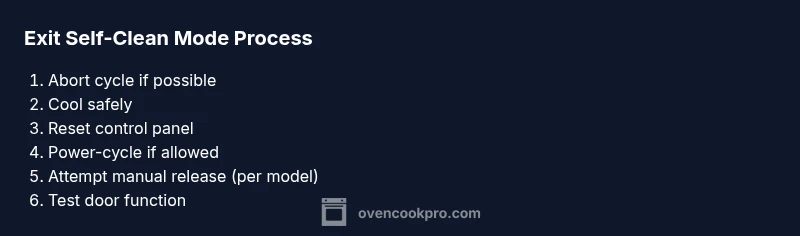
Oven exits from self-clean mode most reliably when you follow a clear plan rather than ad-hoc pushing on the door. Plan includes: (1) stop or abort the cycle if your model supports it; (2) wait for cooling to a safe handling temperature; (3) perform a controlled reset from the control panel; (4) power-cycle the unit if allowed; (5) attempt a manual release only if the manufacturer permits it; (6) re-energize and test the door unlock function after cooling. This approach minimizes the risk of damage to the latch, glass, or seals. According to Oven Cook Pro, models with a clear abort/reset option are easier to bring out of self-clean safely.
When to call for service: signs that need professional help
Even with careful steps, some ovens require service. Signs include a persistent door lock that will not release after cooling and reset attempts, repeated fault codes related to the door latch, strange smells or smoke, or if the door glass or frame shows visible damage. If you hear a buzzing or grinding sound from the latch during attempts to unlock, stop and contact a licensed technician. Do not attempt to bypass safety interlocks, as this can void warranties and increase risk.
Maintenance and prevention after exiting self-clean mode
After you regain access, perform a light inspection of the latch area and door seal for signs of wear. Clean any residue around the latch with a soft cloth and ensure the hinge operates smoothly. Do not run another self-clean cycle immediately after an exit; allow the appliance to cool completely and run a test bake at a low temperature to verify the door operates normally. If your oven has an automatic self-clean re-run option, disable it until you are confident in manual operation.
Tools & Materials
- Owner's manual for your oven model(For model-specific self-clean controls and reset steps)
- Heat-resistant gloves(Protect hands during hot cycles and cooling phases)
- Flashlight(Inspect latch area for obstructions during safe cooling)
- Screwdrivers (Phillips and flat-head)(If model requires panel access per service guide)
- Access to power(Unplug from wall or switch off the breaker before work)
Steps
Estimated time: 60-90 minutes
- 1
Abort the self-clean cycle (if possible)
On many ovens you can press Cancel or Abort to stop the cycle. If the control panel confirms the cycle has been stopped, proceed to the cooling phase. If the cycle cannot be aborted, do not attempt to force the door; move to the safety steps.
Tip: Refer to your manual for the exact abort control and any required confirmation. - 2
Wait for the oven to cool
Even after the cycle stops, the interior can remain dangerously hot. Let the oven sit for at least 60 minutes or until the interior and door latch feel cool to the touch before continuing.
Tip: Do not rush this step; forcing a hot door can cause seal damage. - 3
Check the door lock indicator
Observe the lock indicator light or display message. If it shows locked, do not pry the door. Take notes of any codes or messages.
Tip: This helps when consulting the manual or calling support. - 4
Attempt a controlled reset on the control panel
Use the Reset, Clear, or Cancel sequence as described in your manual to reset the cycle status. Confirm the display returns to a standby state.
Tip: A proper reset reduces the risk of residual lock conditions. - 5
Power-cycle the oven
If the model allows, unplug the oven or switch off the corresponding breaker for 2–5 minutes, then restore power. This can reset internal interlocks without physical force.
Tip: Only do this if your manual confirms it is safe for your model. - 6
Re-check the door unlock function after cooling
Power the unit back on and attempt to reopen or unlock the door gently using the normal control sequence. Do not slam or yank the door.
Tip: If the door remains locked, proceed to step 7. - 7
Consult the manual or service guidance for overrides
If your model provides a documented override or latch-release method, follow it exactly. If no override exists, stop and contact manufacturer support.
Tip: Misusing overrides can void warranties or cause damage. - 8
Call a technician if the problem persists
If the door still won’t unlock after cooling and resets, schedule service with a qualified technician. Describe all attempted steps and any error codes.
Tip: Document the sequence of events to help the technician diagnose quickly.
Questions & Answers
What is the first thing I should do if my oven is stuck in self-clean mode?
Start by stopping the cycle if your model allows it, then let the oven cool completely before proceeding with resets or power-cycling. Avoid forcing the door while hot.
Stop the cycle, wait for cooling, then follow the manual for resets; do not force the door while hot.
Is it safe to unplug the oven to reset it?
Power resets can be safe on many models when done correctly, but always refer to your manual. Unplugging should be done with the appliance off and power switch available, and the breaker off if required.
Only unplug or switch off the breaker if your manual confirms it’s safe for your model.
What if the door remains locked after cooling and resets?
If cooling and resets don’t unlock the door, there may be a faulty latch, sensor, or control board. Do not force the door; contact a technician for a diagnostic.
If it won’t unlock after cooling, a professional diagnostic is needed.
Can self-clean mode cause long-term damage if I force the door?
Forcing the door can damage the latch, glass, or seals and may void warranties. Always follow safety steps and consult the manual.
Forcing the door risks damage; follow safe steps and seek help if unsure.
When should I call a technician for self-clean lock issues?
Call a technician if the door won’t unlock after cooling, if fault codes persist, or if you notice damage to seals or glass.
Call a technician if it won’t unlock after cooling or shows damage.
Watch Video
Main Points
- Abort self-clean when possible
- Cool securely before any action
- Use panel resets rather than forceful door attempts
- Consult model-specific guidance or a professional if unresolved