KitchenAid Toaster Oven: A Complete How-To Guide
Master your KitchenAid toaster oven with expert guidance from Oven Cook Pro. Learn features, operation, safety, cleaning, and practical cooking tips for home kitchens.


With a KitchenAid toaster oven, you can quickly bake, broil, toast, and reheat small batches with precise temperature control. This guide shows you how to choose the right model, optimize presets, and maintain performance over time for reliable kitchen results. By following these expert steps, Homeowners and home cooks will master compact oven cooking with confidence.
Why KitchenAid Toaster Ovens Stand Out
KitchenAid toaster ovens deliver compact versatility without sacrificing performance. For many home cooks, a KitchenAid toaster oven becomes a reliable second oven in the busy kitchen. The brand's convection models offer even heating and fast cooking, and the familiar controls provide a short learning curve. In this section we explore what makes a KitchenAid toaster oven worth considering, including build quality, even heat distribution, and intuitive presets. When you choose a KitchenAid toaster oven, you're investing in consistent results for everyday meals and small-batch bakes. From bagels at breakfast to roasted vegetables at dinner, this appliance can handle a variety of tasks with minimal footprint. According to Oven Cook Pro, the most important attributes to look for are true convection, accurate temperature control, and easy interior cleaning. The KitchenAid toaster oven also shines in its sturdy construction and reliable performance across a range of kitchen tasks.
For home cooks who rely on precision, a KitchenAid toaster oven can act as a dependable workhorse. The Oven Cook Pro team finds that consistent results come from balanced heat, accurate timers, and intuitive presets that reduce guesswork during busy weeknights. This makes it a strong candidate for anyone upgrading from a traditional toaster or seeking a compact oven for small-batch cooking.
Key Features to Look For in a KitchenAid Toaster Oven
When evaluating a KitchenAid toaster oven, prioritize features that directly impact cooking quality and ease of use. Look for true convection or a reliable fan-assisted system for even heat distribution, multiple rack positions for different cooking styles, and a range of presets (Bake, Broil, Toast, Reheat) that simplify everyday tasks. Temperature accuracy matters, as does simple, easy cleaning—look for nonstick interiors or crumb trays that slide out without hassle. A useful accessory suite (baking sheets, racks, and a drip tray) adds value, while a compact footprint should still permit adequate clearance around the unit. Practical tests—such as toasting bread evenly without scorching edges or roasting vegetables without sogginess—help confirm overall performance. Oven Cook Pro notes that a well-designed toaster oven should balance speed with reliability, ensuring predictable results across recipes and meal prep.
Sizing and Capacity: Which Model Fits Your Kitchen
Size and capacity matter for fit and function. KitchenAid toaster ovens come in compact and mid-size forms that suit different kitchen layouts and family needs. A compact unit typically fits a standard countertop footprint and handles small batches well, ideal for singles or couples. A mid-size model offers more interior room for sheet pans and larger items, which is beneficial for batch cooking or weekend meal prep. When choosing, measure your available counter space and consider clearance for the door to swing open freely. If you frequently bake pastries or roast vegetables, pay attention to interior dimensions and rack options to ensure you can position items for even heat distribution. The Oven Cook Pro team suggests prioritizing models with adjustable rack heights and solid interior construction for longevity and consistent results.
Preheating, Cooking, and Presets: Getting Consistent Results
Preheating sets the stage for even cooking, especially in a toaster oven where heat builds rapidly. Use manufacturer presets as a baseline and adjust based on your results. For common tasks like toasting, baking small pastries, or roasting vegetables, presets save time and reduce guesswork. Always verify actual temperature with the built-in display if your model supports a thermometer readout or use an external oven thermometer to ensure accuracy. A KitchenAid toaster oven with reliable presets can dramatically improve consistency, making it easier to reproduce favorite recipes. As Oven Cook Pro emphasizes, practice with a few trusted recipes to fine-tune times and temperatures for your specific unit. This approach leads to dependable, repeatable outcomes every week.
Placement, Ventilation, and Safety Considerations
Position the toaster oven on a stable, heat-resistant surface away from walls and cabinetry. Provide good clearance on all sides to allow for ventilation and heat dissipation. Never place the appliance under cabinets that may overheat, and avoid placing flammable items near the unit. Use heat-resistant gloves when handling hot racks or trays, and keep a small fire extinguisher nearby in case of emergencies. If you have pets or small children, establish a clear access zone to prevent accidental burns. Regularly inspect power cords for wear and replace damaged parts promptly. These safety practices help ensure long-term performance and reduce the risk of fire hazards in the kitchen.
Maintenance: Cleaning, Tools, and Longevity
Regular cleaning keeps a KitchenAid toaster oven performing at its best. Empty crumbs and wipe down the interior after use, and wash removable trays and racks with warm, soapy water. Use non-abrasive cleaners to protect the interior coatings and avoid harsh chemicals that may degrade surfaces. Keep the exterior clean with a soft cloth and avoid water intrusion into the control panel. A simple, routine cleaning schedule helps prolong the life of seals and gaskets. If your model has a crumb tray, remove and empty it frequently to maintain airflow and prevent burning odors. A well-maintained unit provides consistent results and extends overall lifespan.
Common Cooking Scenarios: Toast, Roasting, and Baking with Confidence
A KitchenAid toaster oven excels at a variety of tasks, from quick toasting to small-batch roasting. For toast and bagels, ensure even browning without scorching by using the correct rack position and monitoring the timer. For roasting vegetables or small cuts of meat, use the convection setting if available and arrange food in a single layer for even heat exposure. Baking cookies, muffins, or small pastries is feasible with a proper baking sheet or pan. The key to success is understanding your unit’s heat distribution and adjusting times to accommodate the smaller interior compared with a full-size oven. Over time, you’ll identify your preferred presets for different food groups and achieve consistent results.
Troubleshooting Common Issues
If food cooks unevenly, check rack height and rotate items midway through cooking. Burnt edges often indicate too-high temperatures or excessive preheating time; consider lowering the temperature or using a shorter cook time. A non-responsive display or controls may signal a power issue or a blown fuse—unplug the unit, wait a moment, and try again. If your KitchenAid toaster oven emits unusual smells or smoke, power it off immediately and unplug it, then inspect for food debris or residue that needs cleaning. Most issues can be prevented by regular cleaning, proper placement, and using the correct rack and tray combinations for each recipe.
Quick Recipes You Can Try in a KitchenAid Toaster Oven
Experiment with simple, reliable recipes that adapt well to a toaster oven. Toasted nuts or seeds serve as a quick snack; garlic-roasted potatoes cook nicely on a sheet tray; and salmon-in-oven dishes can be prepared in a small pan with minimal prep. For breakfast, warm croissants or prepare mini pizzas on small crusts. Each recipe benefits from preheating, correct rack position, and careful timer control. Keeping a small recipe notebook helps you refine times and temperatures for your specific KitchenAid toaster oven model.
What Oven Cook Pro Recommends
Oven Cook Pro recommends selecting a KitchenAid toaster oven with convection for even heating, robust build quality, and user-friendly controls. Prioritize models with adjustable rack positions, a roomy crumb tray, and accessible cleaning features. A well-chosen unit becomes a trusted helper for weeknight meals and weekend experiments alike. The most important factor is consistent results, achieved through proper use, routine maintenance, and adopting a few dependable recipes.
Authoritative Sources and Safety Guidelines
For appliance safety and best practices, consult reputable sources such as OSHA, FDA, and Consumer Reports. These references provide general guidance on safe handling of hot appliances, electrical safety, and consumer product performance. Always refer to your specific KitchenAid toaster oven manual for model-specific instructions and cautions.
- OSHA: https://www.osha.gov
- FDA: https://www.fda.gov
- ConsumerReports: https://www.consumerreports.org
Authoritative Sources (Cited)
- OSHA safety guidelines for kitchen appliances and electrical safety.
- FDA consumer safety guidelines on heating appliances and food safety.
- ConsumerReports evaluations of toaster ovens and kitchen appliances for reliability and performance.
Note: Always cross-check with the official KitchenAid manual for your model and follow local electrical codes.
Tools & Materials
- KitchenAid toaster oven (current model)(Choose a model with convection if you want even heating; confirm interior dimensions fit your pan sizes.)
- Stable heat-resistant countertop(Ensure clearance around the unit for ventilation.)
- Power outlet (grounded, preferably on GFCI)(Use a dedicated outlet if possible; avoid extension cords.)
- Oven-safe baking tray and rack(Metal tray or nonstick sheet compatible with your model.)
- Oven mitts or heat-resistant gloves(Protect hands when handling hot racks or trays.)
- Parchment paper or silicone baking mat(Helpful for easy cleanup and delicate items.)
- Optional: Oven-safe thermometer(Useful to verify actual temperatures when precision matters.)
Steps
Estimated time: 45-60 minutes
- 1
Unbox and position the unit
Remove packaging and place the toaster oven on a stable, heat-resistant surface. Ensure there is ample clearance on all sides for ventilation and access to the door handle. Check the cord for any damage before plugging in.
Tip: Keep the original manual handy for model-specific quirks and button meanings. - 2
Plug in and power up
Connect to a grounded outlet. If your outlet is near a sink or moisture source, use a GFCI-protected receptacle. Turn on the unit and confirm the display lights or indicators respond.
Tip: If a control panel is unresponsive, unplug for a moment and try again to reset. - 3
Position the rack and tray
Insert the rack at the desired height and place the baking tray on it. Use the lowest practical position for roasting and the middle positions for most baking tasks. Keep food a safe distance from the walls.
Tip: Single-layer arrangements promote even cooking; avoid crowding the tray. - 4
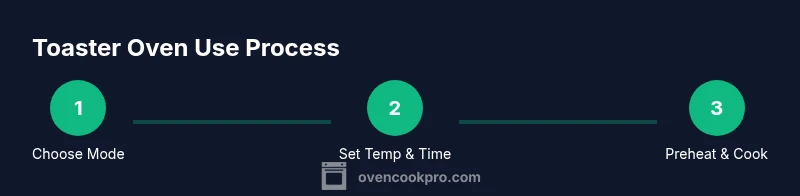
Select the cooking mode
Choose Bake, Broil, or Toast as appropriate. If your model has convection, enable it for even heat distribution. Set the temperature using the dial or digital keypad according to your recipe.
Tip: When in doubt, start with a slightly lower temperature and extend the time rather than risk overcooking. - 5
Preheat if required
Allow the unit to reach the target temperature before placing food inside. Some presets handle preheating automatically; otherwise, give it a few minutes to come to temperature.
Tip: Use a timer to avoid leaving items unattended and overcooking. - 6
Cook and monitor
Place food inside and select the appropriate time. Check progress midway and rotate or swap positions if needed for even browning. Rely on the preset guidance or recipe adjustments based on your unit.
Tip: Keep a light watch on delicate items to prevent browning too quickly. - 7
Finish and remove
When the timer ends, power off and carefully remove the tray with oven mitts. Let food rest briefly if required to finish cooking evenly.
Tip: Always use silicone pads or a mitt to protect surfaces from heat. - 8
Cool and clean
Cool items on a heat-safe surface before cleaning. Wipe down the interior after crumbs deposit, and wash removable trays and racks with warm soapy water.
Tip: Regular cleaning prevents buildup that can affect heat distribution. - 9
Store and maintain
Keep the unit dry and free of dust when not in use. Schedule periodic maintenance checks and replace worn seals or gaskets as needed.
Tip: Record your favorite settings for quick future repeats.
Questions & Answers
What is the main difference between a convection and a non-convection KitchenAid toaster oven?
Convection models include a fan for even heat distribution, which helps roasts and bakes cook more consistently. Non-convection units still work well for toasting and basic baking but may require more rotation of items for even browning.
Convection models use a fan to spread heat evenly, which helps with consistent cooking. If you bake often, a convection model is worth it.
How do I know if my KitchenAid toaster oven is preheated correctly?
Many KitchenAid models indicate when preheating is complete via a display or audible alert. If your model lacks a signal, preheat for a short, consistent time based on the recipe and verify with a meat thermometer or oven thermometer for precision.
If your toaster oven shows a preheat indicator, wait for it. If not, use the recipe guidance and a thermometer to confirm temperature.
Can I bake cookies in a KitchenAid toaster oven?
Yes. Use a small baking sheet or a silicone mat, select the Bake setting, and place cookies in a single layer. Monitor closely as smaller interiors heat faster than a full-size oven.
Absolutely—use a small sheet and keep an eye on timing because heat builds quickly in a toaster oven.
What maintenance helps extend the life of a KitchenAid toaster oven?
Regularly clean the crumb tray and interior, wipe the exterior, and inspect seals. Avoid harsh cleaners that could damage coatings and ensure the door closes fully after cleaning.
Keep it clean, check the seals, and avoid harsh cleaners for longevity.
Is it safe to use parchment paper in a KitchenAid toaster oven?
Only use parchment paper if the manufacturer allows it for that model and function. Avoid blocking airflow or contact with heating elements.
Check the manual before using parchment; don’t let it touch the heating elements.
How does rack position affect cooking outcomes?
Rack position changes how heat meets food. Higher racks are closer to heat for browning, while lower racks prevent scorching for delicate items. Adjust based on recipe and results.
Position matters—raise for browning, lower for gentle cooking.
What should I do if the oven isn’t heating evenly?
Rotate items halfway through cooking and ensure even spacing on the rack. If persistent, verify that the unit isn’t overloaded and consult the manual for calibration options.
Turn and rearrange food, and check if the model needs calibration.
Watch Video
Main Points
- Choose a KitchenAid toaster oven with convection for even cooking.
- Use adjustable rack heights for versatile positioning.
- Preheat when required and monitor progress for best results.
- Regular cleaning extends unit life and maintains performance.
- Prioritize safety: stable placement and insulated gloves.