How to Get Your Oven Out of Safe Mode: A Practical Guide
Learn a safe, step-by-step approach to exiting oven Safe Mode, troubleshot error codes, and know when to call a pro. Expert guidance from Oven Cook Pro to restore normal oven operation.


To how to get oven out of safe mode, start with a full power reset, then inspect the door latch, error codes, and control panel for obvious faults. If the code remains after reset, consult the manual and perform a cautious reinitialization of the electronics. This step-by-step guide from Oven Cook Pro helps homeowners recover normal operation safely.
What Safe Mode Means for Your Oven
Safe Mode is a protective state designed to prevent damage or unsafe operation when a fault is detected. In many ovens, this mode disables heating, restricts features, and shows an error code on the control panel. The goal is to keep you safe while the appliance is inspected. Understanding this state helps you decide whether to troubleshoot at home or call service. If you're curious about how to get oven out of safe mode, know that most fixes start with a controlled reset and a careful check of key components. This article from Oven Cook Pro explains the typical workflow and safety precautions you should follow to avoid shocks or component damage.
Common Triggers That Put an Oven in Safe Mode
Power fluctuations, door latch faults, sensor issues, and control-board glitches can trigger Safe Mode. The Oven Cook Pro analysis shows that many cases originate from minor electrical noise or a briefly lost communication between the keypad and the control board. Look for consistent patterns: repeated resets failing, new error codes, or doors locking unexpectedly. By noting when Safe Mode appears, you can distinguish temporary glitches from persistent faults that require service.
Basic Reset Techniques and Safety First
Before you touch any internal components, power down the appliance and unplug it from the wall. Wait at least 60 seconds to allow capacitors to discharge. Reconnect the power, set the clock if needed, and turn the oven back on. If the display returns to normal and no error code reappears, you’ve likely cleared a transient fault. If Safe Mode returns, proceed to the next steps with caution.
Reading Error Codes: What They Tell You
Error codes guide you toward the faulty subsystem. Check the user manual for the exact meaning of each code and the recommended fix. If codes appear in combination with a blinking light or a locked pad, document the sequence and the behavior. Do not guess; misinterpreting codes can lead to unnecessary components replacement or unsafe conditions.
Step-by-Step Troubleshooting Overview
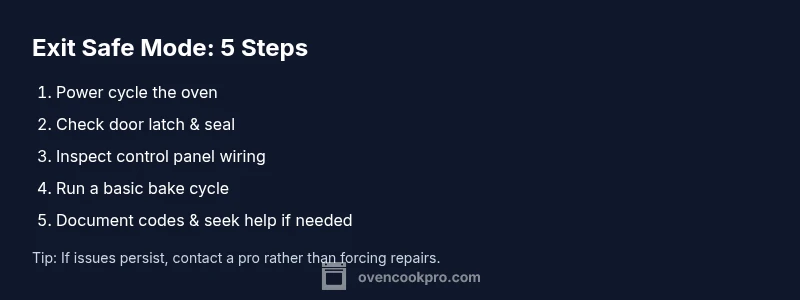
This section outlines a practical plan for exiting Safe Mode without risking safety. Start with a reset, then verify the door latch, keypad, and wiring connections. If codes persist, isolate the control panel from the power briefly and re-test. Finally, run a low-stress bake test to confirm normal operation. If any step feels unsafe, skip and contact a professional.
When to Call a Technician
If Safe Mode remains after multiple resets, or you notice sizzling sounds, burning smells, or visible damage, stop troubleshooting and call a licensed appliance technician. Electrical components inside ovens can hold dangerous voltages even when unplugged. Scheduling a service visit preserves safety and protects your warranty terms as defined by the manufacturer.
Preventive Measures to Avoid Safe Mode in the Future
Keep the oven away from power surges by using a quality surge protector if your home experiences frequent outages. Regularly inspect the door seal and latch for wear, clean control panel touchpoints, and update firmware if your model supports updates from the manufacturer. Consistently using the oven for its intended purpose and avoiding overloading the electronics reduces fault probability.
After Recovery: Maintenance and Best Practices
After exiting Safe Mode, perform a quick trial of bake and broil functions at low temperatures. Record any codes or unusual behavior for future reference. Schedule a routine maintenance check every 12–24 months, or as recommended in your model’s manual. Oven Cook Pro recommends documenting your maintenance history to simplify future troubleshooting.
Tools & Materials
- Owner's manual for your oven(Model-specific reset steps and error codes.)
- Non-conductive gloves(Protect hands when handling internal components.)
- Dry towel or heat-resistant mat(Place the oven on a non-slip surface during access.)
- Clock/timer(Track wait times during resets and tests.)
- Flat-head screwdriver(Only if required by your model for panel access.)
- Digital multimeter(Use only if you are comfortable diagnosing control circuits.)
- Camera or smartphone(Document wiring and displays for reference.)
Steps
Estimated time: 45-60 minutes
- 1
Power cycle the oven
Unplug the oven from the wall outlet, wait 60 seconds to discharge residuals, then plug it back in and reset any clock settings. This clears transient faults that can trigger Safe Mode.
Tip: Use a timer to ensure the wait period is exact; keep hands dry and unplug from a safe outlet. - 2
Inspect the door latch and seal
Check for misalignment, obstructions, or wear in the door latch and seal. A faulty latch can be read as a safety fault by the control system and keep the oven locked in Safe Mode.
Tip: Do not force the latch—look for debris or warped seals and clean or replace as needed. - 3
Check control panel connections
Power down again before accessing the control panel area. Inspect for loose wires, moisture, or corrosion at connectors. A loose connection can disrupt communication and trigger Safe Mode.
Tip: Take photos of wiring before disconnecting anything to aid reassembly. - 4
Test a basic bake cycle
After a successful reset, attempt a basic bake cycle with normal settings to verify heating and control response. If an error code reappears, stop and record the code.
Tip: If you see any unusual smells or smoke, stop immediately and unplug. - 5
Document and interpret codes
Note any error codes and their sequence. Cross-check with the manual to determine the likely faulty subsystem. Do not replace parts based on codes alone.
Tip: Keep a log of codes and steps taken for technician reference. - 6
Call for professional help if needed
If Safe Mode persists after multiple resets or you observe unsafe signs (smell of burning, arcing, or visible damage), contact a licensed appliance technician.
Tip: Check warranty terms and service options before booking a visit.
Questions & Answers
What does Safe Mode mean on an oven?
Safe Mode is a built-in safety state that limits heating and features when the oven detects a fault. It prevents unsafe operation until the issue is addressed.
Safe Mode is a safety feature that reduces oven operation when a fault is detected.
Can I reset an oven without unplugging it?
Some models support a soft reset from the control panel. Check your manual for exact steps, as not all models offer this feature.
Many ovens let you reboot from the panel, but it depends on your model.
Will Safe Mode affect warranty?
Warranty terms vary by model and manufacturer. Review your warranty documentation or contact the maker to understand coverage during troubleshooting.
Warranty depends on your terms; ask the manufacturer for specifics.
Is it safe to run a self-clean cycle after exiting Safe Mode?
Only run self-clean if the oven is back to normal operation and no fault codes reappear. Self-clean can stress components if the issue isn’t resolved.
Don’t run self-clean until you’re sure the issue is resolved.
What if the error code changes after a reset?
If codes change after a reset, record the new code, consult the manual, and seek professional evaluation if the issue persists.
Note new codes and seek guidance if they keep changing.
When should I stop and call a pro?
If you smell burning, see smoke, or the oven stays in Safe Mode after multiple resets, stop troubleshooting and call a licensed technician.
If you smell burning or still see Safe Mode, get a pro.
Watch Video
Main Points
- Reset safely to clear transient faults
- Error codes guide troubleshooting, don’t guess
- Persistent faults require professional service
- Document codes and steps for faster help