Light Bulb Oven Replace: Step-by-Step Guide
Learn how to safely replace a burnt oven light bulb with our clear, step-by-step instructions. Verify wattage, access the bulb, install a correct replacement, and test—plus safety tips from Oven Cook Pro.


Replace a burned-out oven light bulb with confidence. This quick answer previews the goal, essential safety steps, and the basic tools you’ll need. You will learn how to verify the correct bulb wattage, power down the oven safely, access the bulb, and install a replacement that matches your oven’s specifications. Follow these steps to brighten every bake.
Understanding the purpose of the oven light and bulb basics
The oven light serves as a handy indicator to monitor browning and roasting without opening the door. Replacing a light bulb is a common, straightforward task for many homeowners. In this section we cover why the bulb fails (often due to overheating, vibration, or improper wattage) and how to identify the correct replacement. According to Oven Cook Pro, using a bulb with the wrong wattage is a frequent cause of premature failure. Start by locating your oven’s model number in the manual or on the frame, so you can confirm the bulb type and base. Most ovens use a dedicated appliance bulb rated for 120V, and the socket base tends to be a standard type used by many manufacturers. This guide focuses on a safe, methodical approach to ensure you don’t damage the oven’s electrical components or lighting circuit. By understanding the basics, you’ll approach the task with confidence and reduce the risk of accidental shocks or burns. The goal is a reliable, well-lit oven interior that makes baking visible and enjoyable.
Safety first: power, heat, and handling precautions
Safety is paramount whenever you work on an appliance. Before you do anything, cut power to the oven either by unplugging it from the wall outlet or turning off the circuit breaker that supplies the range. Wait for the oven to cool completely; hot glass can cause burns or shatter when touched. Wear protective gloves to guard against sharp edges and hot metal, and keep your work area dry. Do not attempt bulb replacement if the door or enclosure is damaged or if you notice scorching marks on the socket. If you suspect the wiring is compromised, stop and contact a licensed technician. In short: power down, cool down, dry hands, and proceed with caution. Oven Cook Pro’s approach emphasizes patience and safety first to protect you and your kitchen.
Tools and replacement bulb considerations
Before you reach for tools, gather what you need and verify compatibility. Essential items include a replacement bulb that matches the oven’s wattage and base type, heat-resistant gloves, and a soft cloth to wipe the glass. Some models use a small cover or glass lens over the bulb—check whether your model has this extra piece and how it’s secured. If the socket or cover shows signs of corrosion, deformation, or cracking, stop and replace the damaged part or consult a technician. For best results, keep the oven manual handy or take a photo of the bulb area so you can reference the exact bulb type. A quick check against the manual helps ensure you don’t over-tighten a replacement, which can damage the bulb or socket. Oven Cook Pro’s analysis shows that wrong wattage is a common reason bulbs fail prematurely, so confirm the exact specification before purchasing.
Accessing the bulb area: removing racks and the bulb cover
Accessing the bulb often means clearing obstructions. Start by opening the oven door and removing any racks that block the bulb housing. Some models have a small glass lens or a metal cover secured by a screw or twist-lock mechanism. Use the appropriate tool—often a Philips head screwdriver or a coin for a simple slot—to carefully release the cover. If you encounter stubborn screws, apply a small amount of penetrating oil and give it another gentle turn. Never force a component; applying excessive force can strip threads or crack the housing. Once the cover is off, you should see the bulb secured in a metal socket. The step-by-step approach minimizes risk and keeps the interior clean and accessible for the next phase.
Removing the old bulb safely
With the bulb exposed, put on gloves and gently grip the base of the bulb. Avoid touching the glass with bare skin, as oils can shorten the bulb’s life or cause hot spots when heated. Turn the bulb counterclockwise to loosen it and remove it from the socket. If the bulb is tight, give the socket a tiny twist while holding the base steady. Inspect the socket for scorch marks or damage; a damaged socket should be replaced before installing a new bulb. Dispose of the old bulb carefully in a sealed bag to prevent shards from causing injury. Keep the removed bulb nearby in a safe place in case you need to compare base types for the replacement.
Choosing the right replacement bulb: wattage, base, and compatibility
This step is critical for long-term reliability. Always verify the wattage and base type specified for your oven model. Most ovens use a small appliance bulb designed for 120V, but some older or dual-fuel units require different configurations. Maintain a list of compatible bulb types from the user manual and note the bulb’s base (for example, E26 or similar). If you’re unsure, bring the old bulb to a hardware store or contact the manufacturer’s support line for confirmation. Avoid purchasing high-wattage bulbs to prevent overheating. Selecting the correct bulb protects the oven’s light circuit and ensures a safe, stable illumination during baking sessions.
Installing the new bulb and reassembling the interior
Install the replacement bulb by aligning it with the socket and turning clockwise until snug. Do not overtighten, as this can strip threads or damage the socket. If your oven uses a cover or glass lens, reattach it securely. Replace any racks you removed earlier and wipe down the interior to remove fingerprints or smudges. Reconnect power by plugging in the oven or turning the circuit back on. A quick test should follow, but avoid using the full oven heat until you verify the light illuminates reliably. This step completes the nutrient of the job and sets your oven up for effective nighttime baking. Oven Cook Pro notes that a secure, properly seated bulb improves heat distribution within the bulb housing and reduces vibration that can loosen fittings over time.
Testing, troubleshooting, and common mistakes to avoid
Turn on the oven light at a low setting to confirm the bulb is functioning. If it doesn’t light, recheck the bulb seating, look for a blown fuse, and ensure the socket isn’t damaged. Avoid using a bulb with a higher wattage than recommended; this can cause overheating and shorten the bulb’s life. Common mistakes include touching the bulb’s glass with bare hands, over-tightening the bulb, and neglecting to reseal the bulb cover. If problems persist, consult the oven’s manual or contact a professional. These checks help you quickly determine whether the issue is the bulb, the socket, or the electrical supply and prevent repeated missteps.
Maintenance reminders, safety wrap-up, and quick recap
Keep spare bulbs of the correct type in a dedicated drawer for future replacements. Periodically inspect the socket and cover for wear or corrosion and replace damaged parts promptly. Store the user manual and any notes about model-specific bulb requirements in an accessible place. The key to a successful light bulb replacement is a measured approach: power off, verify compatibility, install securely, and test gently. By following these steps, you’ll maintain safe illumination in your oven and extend the life of related components. The Oven Cook Pro team emphasizes methodical work and adherence to the manual for durable results.
Tools & Materials
- Replacement oven bulb(Check the oven’s manual for the correct base type and wattage)
- Heat-resistant gloves(Protect hands from heat and sharp edges)
- Screwdriver or coin (if needed)(For screw-based covers or twist-lock fittings)
- Soft cloth(Wipe fingerprints from glass surfaces)
- Owner's manual(Verify bulb specifications and access method)
- Spare bulb storage(Keep extras for quick replacements)
Steps
Estimated time: 15-25 minutes
- 1
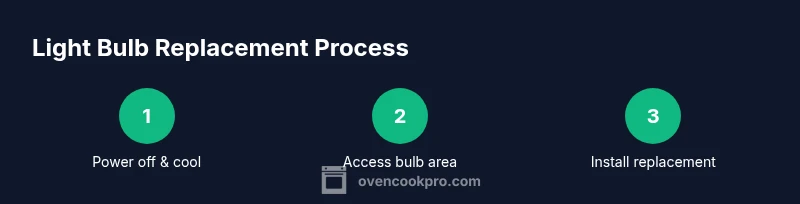
Power off and cool the oven
Unplug the appliance or switch off the circuit breaker serving the oven. Allow the interior to cool completely to avoid burns when touching glass or metal. This initial safety check reduces the risk of electric shock and injury.
Tip: If the oven recently ran, give it extra time to cool; hot components can cause severe burns. - 2
Access the bulb area
Open the door and remove obstructing racks if needed to reach the bulb housing. Some models have a small cover or lens; locate it and prepare to remove without forcing components.
Tip: Take a photo of the current setup before removing parts to ensure correct reassembly. - 3
Remove the bulb cover
If a cover is present, rotate or unclip it to expose the bulb. Use a screwdriver or your fingers, depending on the design. Do not pry aggressively.
Tip: Keep the cover in a safe place so you can reinstall it easily. - 4
Remove the old bulb
Grip the base (not the glass) and rotate counterclockwise to loosen. Withdraw the bulb straight out once it’s loose. Inspect the socket for damage.
Tip: If the bulb is stuck, don’t force it; use a small amount of penetrating oil around threads and retry after a few minutes. - 5
Verify replacement bulb compatibility
Check the replacement bulb’s wattage and base type against the manual or socket label. Using an incorrect bulb is a common cause of failure and can pose safety risks.
Tip: If in doubt, contact the manufacturer’s support for a quick confirmation. - 6
Install the new bulb
Insert the new bulb into the socket and rotate clockwise until snug. Do not overtighten; it can damage the socket or the bulb. Reattach any covers securely.
Tip: Wearing gloves helps prevent oils from your skin transferring to the bulb base. - 7
Reassemble and reconnect
Replace any racks and the bulb cover. Restore power by plugging in the oven or turning the circuit back on. Ensure everything sits evenly and the enclosure is closed properly.
Tip: Double-check that all parts sit flush to avoid rattling or interference with baking temperatures. - 8
Test the light and troubleshoot
Turn on the oven light at a low setting to confirm operation. If it doesn’t light, recheck seating, inspect the socket for damage, and verify the circuit is live. Seek professional help if needed.
Tip: If the bulb flickers, remove it and check the base for bent contacts.
Questions & Answers
Do I need to unplug the oven before replacing the light bulb?
Yes. Always unplug the oven or switch off the circuit breaker and let the interior cool before handling the bulb.
Yes—unplug the oven and let it cool before starting.
What wattage bulb should I use for my oven?
Check the oven’s manual or socket label for the recommended wattage and base type. Use a replacement that matches those specifications.
Use the wattage and base type listed in your manual.
Can I replace the bulb while the oven is warm?
No. Wait until the oven is completely cooled to avoid burns or glass breakage.
No—wait for it to cool completely.
What if the new bulb still doesn’t light?
Ensure the bulb is fully seated, check the fuse or circuit, and inspect the socket for damage. If unresolved, consult a professional.
If it still won’t light, check seating and socket, then seek professional help.
Is LED allowed in oven lighting?
Only if your oven manual allows LED appliance bulbs rated for 120V. Some ovens require incandescent or halogen types.
Only if your oven supports LED bulbs per the manual.
How often should I replace the oven light bulb?
Replace when it burns out. If you notice frequent outages or flickering, inspect the fixture for damage.
Replace when it burns out, and check the fixture if it flickers.
Watch Video
Main Points
- Power off before touching the bulb area.
- Verify wattage and base type from the manual.
- Install securely without overtightening.
- Test the light at low heat and inspect for proper operation.
- Keep spare bulbs and document model notes for future maintenance.