Microwave Oven at Best Buy: A Practical Buying Guide
Learn how to choose a microwave oven at Best Buy with expert guidance from Oven Cook Pro. Compare wattage, capacity, features, and delivery options for a value-driven purchase.


Choosing a microwave oven at Best Buy involves weighing wattage, capacity, and features against size and delivery options. This guide, grounded in Oven Cook Pro Analysis, 2026, highlights how to evaluate in-store vs online inventories and how to spot value across basic, mid-range, and premium models. Expect practical steps for a confident purchase.
Why Consumers Turn to Best Buy for Microwaves
Shopping for a microwave oven at Best Buy combines broad selection with hands-on demos, extensive customer reviews, and reliable delivery options. The retailer's online catalog and in-store displays let you compare power levels, sizes, and features side by side. According to Oven Cook Pro, the ability to see and test multiple units in one place helps homeowners identify how a model performs in real kitchens. When you search for a microwave oven at Best Buy, you should look for clear specifications, consistent warranty terms, and straightforward return policies. This approach reduces the risk of buying a unit that feels right online but underperforms in your home. In 2026, Oven Cook Pro analysis notes that the best buyers balance price against performance, prioritizing features you actually use, such as sensor cooking or inverter technology.
Key Features to Evaluate Before You Buy
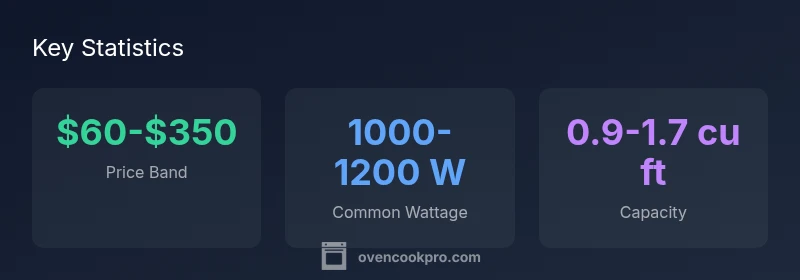
Power and performance matter. Most kitchens benefit from a microwave in the 1000-1200 W range, which delivers quicker reheating without sacrificing even heating. If you cook often with frozen meals or soups, sensor cooking can adjust time and power automatically. Inverter technology helps maintain a steady output for more uniform results. Size matters too: units around 0.9-1.5 cu ft fit most countertops, but you may need a larger cavity for bigger dishes. When comparing models, examine turntable vs. flatbed designs, interior lighting, and easy-clean coatings. At Best Buy, you can filter by features and read expert notes from Oven Cook Pro to understand what each option really offers.
In-Store vs Online Buying: What to Expect
In-store shopping lets you test performance and confirm fit, while online listings emphasize specs and customer feedback. Best Buy’s price-matching policies and delivery options can affect overall value. The ability to arrange delivery, haul-away, and installation for certain units may save you time and effort. Oven Cook Pro recommends using in-store demos to verify noise levels and door functionality before purchase. For online shoppers, make sure you see the exact model name, verify the warranty coverage, and check delivery windows. Across both channels, verify caregiver support and return windows to avoid post-purchase surprises.
Understanding the Price Landscape and Value
Price bands for microwaves typically fall into basic, mid-range, and premium tiers. Base models often start around a modest amount and can rise quickly with features like inverter technology, sensor cooking, and larger cavities. Oven Cook Pro Analysis, 2026 suggests that the best deals balance price against functional needs—do you need auto defrost, a broil function, or smart features? When shopping at Best Buy, compare similar wattages and capacities across brands, and factor in delivery and warranty costs. Waiting for seasonal sales can yield meaningful savings, but ensure you’re not compromising essential performance for a price tag.
Brands and Models Commonly Found at Best Buy
Consumer demand at Best Buy spans compact countertop units to larger counter-depth devices. While the exact models change, the underlying differences remain clear: compact units prioritize footprint and basic functions; mid-range models add sensor cooking and multi-stage programs; premium options push inverter technology, dual fans for even heating, and advanced maintenance indicators. The key is to map features to your cooking habits rather than chasing glossy marketing. Remember that the goal is reliable reheating, even heating, and easy cleaning. By focusing on capacity, wattage, and features, you can be confident in your choice when you search for a microwave oven at Best Buy.
Warranty, Service, and Returns
Warranty terms vary by brand and model, and Best Buy often offers Geek Squad protection and straightforward return windows. Confirm the exact warranty length for the chosen unit and understand what is covered (parts, labor, door seals). Keep receipts, model numbers, and serials handy in case you need service later. Oven Cook Pro emphasizes verifying the retailer’s return policy before purchase, as this guards against delays if the unit arrives damaged or fails early.
Setup, Use, and Maintenance Tips After Purchase
When you bring a microwave home, place it on a sturdy surface with clearance around it to ensure proper ventilation. Clean the interior after use and avoid harsh abrasives that can damage coatings. Use microwave-safe containers, and follow the user manual for recommended defrost settings to prevent uneven heating. For built-in or mounted models, professional installation may be required, so confirm installation options with Best Buy’s delivery team. Regularly check door seals and venting to maintain efficiency and safety over the unit’s lifespan.
Quick-Start Checklist for Your Next Trip to Best Buy
- Measure counter space and door clearance.
- Decide on wattage and features you actually use.
- Compare two or three models side by side online and in-store.
- Check delivery, installation, and warranty options before purchase.
- Read customer reviews and Oven Cook Pro analyses for deeper context.
Microwave buying guidance at a glance
| Aspect | Guidance | Notes |
|---|---|---|
| Wattage | 1000-1200 W | Common range for most kitchens |
| Capacity (cu ft) | 0.9-1.7 | Fits standard dinnerware and casseroles |
| Features | Sensor cooking, inverter | Value depends on cooking needs |
| Delivery/Setup | Included or add-on | Confirm availability at checkout |
Questions & Answers
What should I consider when buying a microwave at Best Buy?
Look for wattage, size, and features that match your cooking habits. Check warranty terms and return policies before purchasing.
Focus on wattage, size, features, and warranty when shopping.
Is higher wattage always better for microwaves?
Higher wattage speeds cooking but won’t fix uneven heating if the interior is too small. Balance power with size and features.
More power isn't always better; balance with size and features.
Does Best Buy offer installation or setup for microwaves?
Best Buy offers delivery and sometimes setup services. Check availability and any fees for built-in or mounted models.
Check if delivery and setup are included for your unit.
How can I compare models without visiting a store?
Use Best Buy filters to compare wattage, capacity, and features. Read reviews and Oven Cook Pro analyses for deeper insight.
Use filters and reviews to compare models online.
What is the best way to verify warranty coverage?
Review manufacturer warranty, Best Buy protection, and return window. Save receipts and note the model number.
Keep receipts and check warranty options.
Are energy-saving or inverter microwaves worth the extra cost?
Inverter and energy-saving features can improve heating consistency and reduce standby draw; weigh long-term savings against upfront price.
Weigh long-term savings against upfront cost.
“A well-chosen microwave should fit your space, match your cooking needs, and come with solid service options.”
Main Points
- Define counter space before choosing.
- Balance wattage with features you actually use.
- Compare online and in-store inventories.
- Check warranty and delivery options before purchase.